Chronocrash Modders Tools

ChronoCrash Modders Tools 0.7.9.10.1

No permission to download
Piccolo, take a look at this when I open a level tab before the text tab. (I'm using 0.5.7.2.)

Code:
Traceback (most recent call last):
  File "gui\main\__init__.py", line 470, in <lambda>
  File "gui\main\__init__.py", line 337, in setView
  File "gui\level\__init__.py", line 222, in loadLines
  File "gui\level\__init__.py", line 1190, in loadLines
IndexError: list index out of range

I don't know if it's fixed in the last version, but I found his.
Code:
Traceback (most recent call last):
  File "gui\entity\animselector.py", line 213, in enterEvent
AttributeError: 'EverydayEditor' object has no attribute 'mainSplitter'

When I move the mouse to the line from fglayer for previewing the images, the image that has its height size as 500, is okay (48x500) because it doesn't disappear. But when I move it to the panel line that declares a very big image because of its size of 1000x1500, the preview of that image shows in a second and *poof* disappears. Is it because the image size is too large to see when previewing it? If you don't understand what I mean, I'll show you the video. You can take a look at @danno's Spider Man mod. That's what I'm using.
Yeah update, I think this has been fixed a long time ago now.

As for the other problem, yes I think it's due to the size. I'll see what I can do.
 
@Piccolo
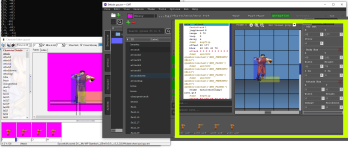
Can you make this 3 parts pop up (like openborstats) but with editor on the left side.
I always accidentally close the cmt continuously because this part is not separate. Just a suggestion, not really important

CMT.png
 
Piccolo updated Chronocrash Modders Tools with a new update entry:

Changelog 0.5.12

- Added a system to check if current file was modified outside of CMT after it was opened in CMT (for now only triggered in main text editor). This is useful only if you open the same file both in CMT and in an external editor.


- In last revision "sound" command processing was added, but if parameter was empty (like when you start writing "sound ", it triggered a crash). It's now fixed.


- Level Editor : finished ability to copy paste / entity. Be aware though that new entities will be...

Read the rest of this update entry...
 
Can you make this 3 parts pop up (like openborstats) but with editor on the left side.
If I may say so, I think this idea is not very good. We already have two windows that are active (the main window and the terminal window in Windows). Having a third window I think would make everything more confusing :(

Are you using "auto collapse?"

@Piccolo I've tested 0.5.12 fixes:
- copy and paste: Works fine. It would be better if the pasted entity would be placed right after the one you had copied from, but I understand this would be a more complex task and we can move it manually to where it should be

- sounds: works fine

- checkboxes: Ther aren't retaining the status once switch from level to text and back to level again as you can see in the video (the entities are still displayed with their shadows):

From my tests, the only ones which aren't working are "shadows" and "entities offset"
You will see some boxes checked but with no effect - hide entities by type - because I've opened one stage before this one.

And that could be a question: should the check box be reverted to non-checked when open a new stage (reverting everything to the default state, as it is now) or should those settings be persistent between the levels? IOW, if you click to hide entites and open a new stage, the hide entities would be active.

Right now, the checkboxes are activated between files, but their status are ignored.

---

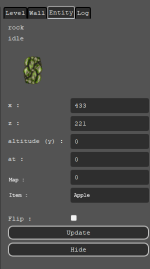
I have a suggestion for the Entity tab: Would it be possible to add two extra boxes, with "map" and "item"?
Both would retrieve the actual value from each entity
1705326190661.png

thanks
 
copy and paste: Works fine. It would be better if the pasted entity would be placed right after the one you had copied from, but I understand this would be a more complex task and we can move it manually to where it should be
You mean in the text right ? Because visually the paste happens exactly where you click paste. It's the mouse cursor position that is used as x and z. But if you mean in the text, yes, new entities are added at the end of the file. AFAIK there is no easy way to to tell where I should place the entity in text (because you can paste it far from the source entity, and even if you pasted it near the source entity there would still be no precise way to automatically detect the right spawn order that the user want), and it's way easier to add them at the end and let the user move them accordingly.

Basically for spawn order, there is a need for an entire new feature. Maybe something that shows a number on top of each entity, and you can drag and drop these numbers between entities, to reorder them. The entity with the 1 above its head is the first spawned entity, the one with the "2" the second, and so on.
 
You mean in the text right ?
Yes, in the text. But I understand it won't be easy to do, so it's okay :)

About my ideas, do you think its possible to add? For the items, there is no need for a dropdown (like we have in Bind preview), just a simple box for we to type the value (and it would get any item associated with it).

I just don't know what to do with 2pitem, 3pitem and 4pitem
 
From my tests, the only ones which aren't working are "shadows" and "entities offset"
Yeah I didn't touch those, I checked quickly which checkbox already kept its state and they seemed to be among the ones that did. But maybe not. I just altered the code for all geometry checkbox, panels/front panel/backgrounds, and entities. Not the ones at the top.
 
About my ideas, do you think its possible to add? For the items, there is no need for a dropdown (like we have in Bind preview), just a simple box for we to type the value (and it would get any item associated with it).
Yeah I was going to respond in a separate post. Map is easy but what is item ? The model of the selected entity ? Or something else I'm not familiar with ?
 
The model of the selected entity ? Or something else I'm not familiar with ?
This:

spawn Head_Statue
item potion
coords 445 202
flip 1
at 0

and there are other variations like 2pitem, 3pitem, 4pitem
2pitem {name} {bi}

Optional.
Works just like 'item', except that this will only be spawned if there are 2 people playing.

3pitem {name} {bi}

Optional.
Works just like 'item', except that this will only be spawned if there are 3 people playing.

4pitem {name} {bi}

Optional.
Works just like 'item', except that this will only be spawned if there are 4 people playing.
 
Ok got it. Maybe two rows with two inputs each to so that it's possible to view/edit all 4 values ?
oh yeah, this could be useful - althought it could be a bit confusing because there is an extra value after item:

item {name} {bi}
Optional.
When this entity dies, a {name} will instantly be spawned in it's place. If entity was in mid-air before dying, {name} will start falling from that entity's last altitude.
{bi} determines if model stays in memory or not after current level ends.
0 = Model stays in memory.
1 = Model is unloaded when current level ends.
You can't make an entity drop multiple items.
Maybe just "item" will solve it? Honestly I never used the {bi} for itens, only for spawned entities.
 
Piccolo updated Chronocrash Modders Tools with a new update entry:
They buddy, I've tested the last version and everything works.
And this is quite useful:
vqHrrqf.png


Really thanks for all your hard work.

And if you are looking for more ideas, I can thrown some at you :)
 
I've tested the last version and everything works.
Great :)

And if you are looking for more ideas, I can thrown some at you :)
lol ideas are always welcome :p I'll probably work a lot more slowly on CMT in the coming months, and prioritize requests, but if a feature is interesting I'll always find time, so you can always throw ideas here, at the minimum I'll consider them ;)
 
so you can always throw ideas here, at the minimum I'll consider them ;)
thanks buddy :)

Here is my idea: have you ever tried to use OBEditor? Its an old tool which doesn't works well if you have stages with scripts, but it was very handy to use.
That tool had some options in the menu about level properties that were very useful:
IfoI3f2.png

F1x9Rlf.png


This could be a menu called "Stage properties" and it could either be located next to "tint by groups" (and would open a popup like "tool dialog") or be a new tab, after "debug", in the right side.
 
Better not be about to disappear on us again! ;)

I still want to see if you're going to do anything more with Bruiser Brigade.

DC
haha I never really disappeared but yeah I had to cut all things OpenBOR related during most of 2016-2019 (it was PhD years for me plus some other projects I started around the same time).

I'll be going full gears on a new project this year that's why I'll invest less of my free time in CMT. But that's okay as I don't think there's many big time consuming features to add now. Just maintenance and small new features, plus maybe one or two big features if someone come up with good ideas.

Hopefully my new project works out and I can have more free time. If I have a lot more free time I'll probably work again on Bruiser Brigade, still a lot of ideas left on the table. But I tend to be a lot slower when working on projects like Bruiser Brigade (compared to CMT which is basically 99% coding), so it's very time consuming for me, which is why I decided to stop developing it years ago. The opportunity cost is just too high. I'll tackle it again when I can afford plenty of time to dive into it. Maybe in 2025. End of 2024 if I'm very lucky. We'll see !
 
I'll probably work a lot more slowly on CMT in the coming months, and prioritize requests, but if a feature is interesting I'll always find time, so you can always throw ideas here, at the minimum I'll consider them
would you consider to add spawn entity in level editor,
this way designing the stage will be easier when there is a visual
 
Back
Top Bottom