
You are using an out of date browser. It may not display this or other websites correctly.
You should upgrade or use an alternative browser.
You should upgrade or use an alternative browser.
Canceled [ORIGINAL] Shinobi Densetsu (HELP NEEDED!)
- Thread starter kzr
- Start date
Project is halted prior to completion and will not receive further updates.

Bloodbane
Well-known member
can anyone tell me why I get a game over on stage start even with 999 lives?
Sounds like your character is killed by wall or hole right when stage starts. Did you place wall or hole near starting point?

kzr
Member
thanks but the problem was really no enemy in the level. my biggest challenge right now is setting up level collisions properly. I have yet to try the new modders tool with better highlighting, that's going to help a lot.Sounds like your character is killed by wall or hole right when stage starts. Did you place wall or hole near starting point?
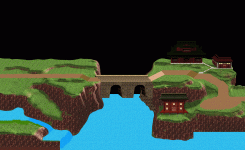
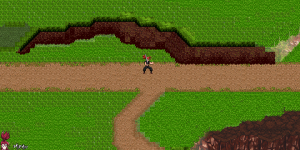
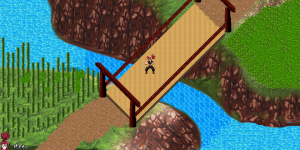
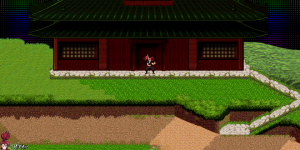
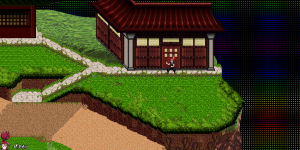
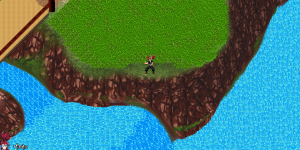
I'm trying not to go overboard with level design, but I want some exploration. this is an early mockup of the first zone. left side will have a forest of mostly entities aka breakable trees, animated foliage and interactive scenery. right side will host a village. the houses will also be entities, this is just to preview scale and layout. character size is slightly shorter than a doorway.



O Ilusionista
Captain 100K
oh that is a big map! Looking cool.one whole week working on this map! this is what it's looking like in-game. still far from finished but I like how everything's coming together
you can animate that water using water transformations btw

Grit
Well-known member
Loving the art style.
The playable character reminds me of Okinawa rush.
I hope you find someone since I tried my hand at game developing and without these guys and their tools.
Everything I done would have be an after thought.
I hope your outcome is a positive one cause I'm a fan of pixel art with a ton of animations.
All the best.
The playable character reminds me of Okinawa rush.
I hope you find someone since I tried my hand at game developing and without these guys and their tools.
Everything I done would have be an after thought.
I hope your outcome is a positive one cause I'm a fan of pixel art with a ton of animations.
All the best.
kzr
Member
thanks! the hub zones are going to be around this size. each one will connect to dungeons, interiors and others hubs or zones. sublevels are easier to build, they're mostly 2D and I really can't wait to start one. I've done some mockups but never tried them in-game.oh that is a big map! Looking cool.
you can animate that water using water transformations btw
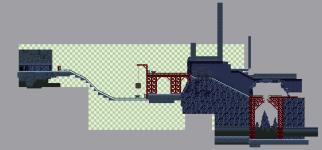
mines:
water transformations sounds great! I'm just painting tiles on top of a 3D render, this is all static at the moment. on Construct I had mode 7 and shader effects on water, here I was wondering what options I have and was thinking a good simple way would be to play with drawmode, animated panels and some parallax effects with backgrounds above the surface. idk I'm not sure yet. but I'm definitely happy with this method
@Grit thanks too. although it's not all pixel art or "real" pixel art

Last edited:

Construct I had mode 7 and shader effects on water
"Mods" kills kittens. "Is it possible" kills Koalas. Wish I knew what "mode 7" killed.
Anyway, we don't have "mode 7" because there's no such thing, but we do have controllable affine transformation. We call them watermode, but that's really just a naming artifact because it was originally for, well, water. The options are either a sine wave effect, or a parallax affine transform. In the later case you can define the top and bottom widths, then the engine handles all the rest.
Nothing says it has to be background layers or water either. Notice the ground here:
If you want to get fancy with script, the effects become "whatever the heck you can think of". As one example (mind you it's a crude prototype I was working on), here is a vertical perspective rail shooter.
In a slightly more polished example, the storm clouds here scroll both vertically and horizontally. This one also shows the sine wave effect in action (lake water).
HTH,
DC
Last edited:
O Ilusionista
Captain 100K
rhinos!Wish I knew what "mode 7" killed.
kzr
Member
@DCurrent yeah, mode 7 is what most people call it, makes it easier to get the point across. it could be called super vga or Nvidia dlss as far as I'm concerned 
those videos look great, that's exactly the kind of effects I'm looking for.
I'm sure I'll come back asking more about this down the line when it comes to the polishing phase
those videos look great, that's exactly the kind of effects I'm looking for.
I'm sure I'll come back asking more about this down the line when it comes to the polishing phase
kzr
Member
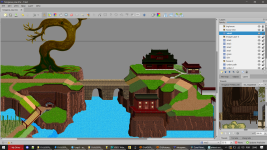
one last behind the scenes look at the area map before going to the OpenBOR side of things. the houses need a remake but they won't be merged with the terrain image, they will be added later as entities. I also don't like the giant tree that much, will end up remaking it at some point


NED
Well-known member
I absolutely love it...busy week, just a bit of level design in between
View attachment 7352
I never got into level designing (graphics works, platforming etc) because I know I don't have the skills to code such an advanced map in openbor.
I dream of the day you can open this kind of landscape in a coding software and add all the platforming/relief elements with boxes etc visually in a software making it more "coder-friendly"
kzr
Member
this is 2D platform style so it's pretty straightforward. it's when the depth axis comes into play that I lose my mind ^^I absolutely love it...
I never got into level designing (graphics works, platforming etc) because I know I don't have the skills to code such an advanced map in openbor.
I dream of the day you can open this kind of landscape in a coding software and add all the platforming/relief elements with boxes etc visually in a software making it more "coder-friendly"
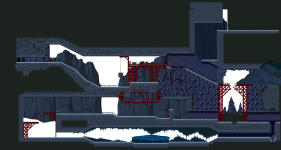
the mines got a bit more love
kzr
Member
Designing levels is one thing, but I'm having issues with the implementation. It's been a long time, so I'm not sure what I'm doing wrong
zmin/max in levels.txt are the same so according with the documentation 2D mode is on and no in/out movement should be allowed
however regardless of where I spawn my player 1, it gets teleported to the top left and has about 120 pixels of Z movement allowed. I can't go into the playable area no matter what. Tried setting the same Z value for everything but 2D mode still won't activate?
does anyone have a good tutorial to recommend? I searched both the forums and the wiki, I only get fragments of information in the matter, and I really don't want to deconstruct an example game for what could be a simple oversight.
zmin/max in levels.txt are the same so according with the documentation 2D mode is on and no in/out movement should be allowed
however regardless of where I spawn my player 1, it gets teleported to the top left and has about 120 pixels of Z movement allowed. I can't go into the playable area no matter what. Tried setting the same Z value for everything but 2D mode still won't activate?
does anyone have a good tutorial to recommend? I searched both the forums and the wiki, I only get fragments of information in the matter, and I really don't want to deconstruct an example game for what could be a simple oversight.
Bloodbane
Well-known member
I think I see two issues there:
1. z setting is incorrect.
2. player 1 is spawned in wrong coords.
For #1, you should declare z from lowest point player could be in your panel. For #2, I suggest using script to define player 1's starting coords.
And since camera starts from top of panel, you should also need to declare script to put camera close to player 1's starting coords.
Do you need examples for those?
1. z setting is incorrect.
2. player 1 is spawned in wrong coords.
For #1, you should declare z from lowest point player could be in your panel. For #2, I suggest using script to define player 1's starting coords.
And since camera starts from top of panel, you should also need to declare script to put camera close to player 1's starting coords.
Do you need examples for those?
kzr
Member
in levels.txt both are 0 so yeah my error here. that part is taken care of.I think I see two issues there:
1. z setting is incorrect.
2. player 1 is spawned in wrong coords.
For #1, you should declare z from lowest point player could be in your panel. For #2, I suggest using script to define player 1's starting coords.
And since camera starts from top of panel, you should also need to declare script to put camera close to player 1's starting coords.
Do you need examples for those?
I noticed that CMT translates viewer Y coordinates into engine Z for entities and terrain boxes. which is right for 2,5D but not so much in 2D.
terrain solids work well for simple levels
but if you take the mines here
 you can't do that shape no matter how many solids you use, because you can't build a room under a wall in 2D with just solids.
I can only do the base floor at the very bottom because if the platforms go higher they stretch instead of floating, if that makes any sense.
I probably need extra platform entities to pull this off but...
how would I make ramps without basemaps and without wasting a ton of entities to simulate a ramp? can I rotate entities and if yes, will the platform defined within also rotate?
a camera script example would be nice. I would even try to make it dynamic, reacting to player direction.
right now I have 4-5 levels ready to be paved with platforms. once I get this sorted out, it'll be time to populate the levels and add some actual gameplay
Last edited:
O Ilusionista
Captain 100K
I don't think so. it's more of an optical illusion, not a problem with the tool.I noticed that CMT translates viewer Y coordinates into engine Z for entities and terrain boxes.
The Y axis is controlled by the value you put in "ALT", not the Z axis.
Look at this level from my game: it's a 2D level, where you start at the bottom right of the screen and go up to the top left. The Z value is 1288 (which is where the shadow appears) but the ALT is 70, and that is what makes the character appear in the air.
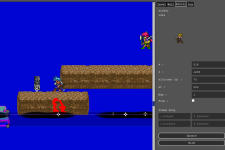
It's natural that when you move something on the Z axis it appears to be "higher" or "lower" on the Y axis, but it's just an optical illusion.
O Ilusionista
Captain 100K
You can use obstacles with platforms for that. as obstacles blocks the players too.you can't do that shape no matter how many solids you use, because you can't build a room under a wall in 2D with just solids.
To simulate a floating ramp you would need scritp. It would be cool if we could add walls and basemaps on air (right now, they are bound to the ground)how would I make ramps without basemaps and without wasting a ton of entities to simulate a ramp? can I rotate entities and if yes, will the platform defined within also rotate?
And no, if you rotate an entity, the platform won't rotate at all - nothing gets rotated in fact, neither bbox, platform or attackbox, the rotate is just visual.
Also, in platforms, they aren't even flipped if you flip the entity.
What you want to do? Maybe @Bloodbane or @Kratus can share some codes with you, as both have games where the camera follows the player (SORX has it on the first SOR2 stage, if I am not mistaken). You can try looking into Double Dragon Reload Alternate, as it has a script for that too - he also gave a suggestion on an issue I had here Changing Cameratype by script · Issue #282 · DCurrent/openbora camera script example would be nice. I would even try to make it dynamic, reacting to player direction.