Best way to use PNG or PCX images for backgrounds?

DJGameFreakTheIguana

Active member
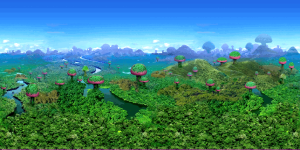
Pretty much this. Using ripped 3D images for backgrounds and panels for a mod, fitting the sprites I'm using, but GIF images, as expected, don't work, as the color loss is too noticeable. Here's one of the backgrounds, the png, and the gif. It's ripped from Sonic Adventure 2, which really used photorealistic backgrounds.

1744772010854.png1744772026537.png
 
Pretty much this. Using ripped 3D images for backgrounds and panels for a mod, fitting the sprites I'm using, but GIF images, as expected, don't work, as the color loss is too noticeable. Here's one of the backgrounds, the png, and the gif. It's ripped from Sonic Adventure 2, which really used photorealistic backgrounds.

View attachment 10497View attachment 10498

You can use a 24bit png for layers and the background - not panels though, but nothing stops you from making the panel blank and have a layer to represent it.

DC
 
I see, how would I go about doing that. I've never messed with the bits before. I also forgot about PCX images and tried that out, but that crash the mod to.

You SHOULD forget .pcx. That's an archaic format that never should have been supported to begin with. For .png, just save it as a 24 bit .png file and add it as an fglyaer or as the Background. Same as an other layer image. That's pretty much it.

DC
 
You SHOULD forget .pcx. That's an archaic format that never should have been supported to begin with.
One less thing to worry about

For .png, just save it as a 24 bit .png file and add it as an fglyaer or as the Background. Same as an other layer image. That's pretty much it.

DC
Ok, had to search how to do that and I found my issue. I'm still using paintxp and Irfanview for the majority of my image editing, and MOSWorkshop to swap the palettes until the BG color is transparent. Gimp was the first thing recommended, tried it, didn't even have the option to remove alpha channel, exported it, and now the background works as intended. Thanks DC

x)
 
One less thing to worry about


Ok, had to search how to do that and I found my issue. I'm still using paintxp and Irfanview for the majority of my image editing, and MOSWorkshop to swap the palettes until the BG color is transparent. Gimp was the first thing recommended, tried it, didn't even have the option to remove alpha channel, exported it, and now the background works as intended. Thanks DC

x)
Awesome. Glad you got it going! (y)

DC
 
@DJGameFreakTheIguana while you can't use 24bit images for panels directly, you can use the same "RGB trick" we use in Mugen, take a look:
 
@DJGameFreakTheIguana while you can't use 24bit images for panels directly, you can use the same "RGB trick" we use in Mugen, take a look:
Yo O, I was waiting to reply when I got a chance to try this trick. I actually don't need it since the Panel already comes in good since it used less Colors but I wanted to at least know if it would work. I can't get the trick to work as intended, at least not with png files. I can't seem to declare pngs and BGLayer or the mod crashes, and just to be sure, I declared the background I got to work before as another BGLayer and changed the background as the gif copy, and removed the 3 BGLayers for the 3 colors. I ended up getting this message
********** An Error Occurred **********
* Shutting Down *

Error loading file 'data/bgs/0/BG0pp.png'Total Ram: 16868343808 Bytes ( 16086 MB )
Free Ram: 2726756352 Bytes ( 2600 MB )
Used Ram: 80486400 Bytes ( 76 MB )

Release level data...........
Level Unloading: 'data/levels/MM0.txt'
Total Ram: 16868343808 Bytes ( 16086 MB )
Free Ram: 2726748160 Bytes ( 2600 MB )
Used Ram: 80490496 Bytes ( 76 MB )

RAM Status:
Total Ram: 16868343808 Bytes ( 16086 MB )
Free Ram: 2726748160 Bytes ( 2600 MB )
Used Ram: 80490496 Bytes ( 76 MB )

Done!

Release graphics data........ Done!
Release game data............
I even ran another test just using Background without any bglayers, and both the png and gif copies work, but when I set that png copy as a BGLayer, the mod crashes
 
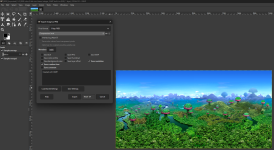
Yea I found the option in Gimp, and even went back to see if it remember I chose the option that I assumed was 8-bit, but even before then at the top of the screen, it even says it's in 8-bit. This is a totally different background but this came from Sonic Heroes, which still used photorealistic BGs. Still, Openbor crashes if I declare this as BGLayer
1745278669364.png

********** An Error Occurred **********
* Shutting Down *

Error loading file 'data/bgs/1/BG0.png'Total Ram: 16868343808 Bytes ( 16086 MB )
Free Ram: 7281930240 Bytes ( 6944 MB )
Used Ram: 90996736 Bytes ( 86 MB )

Release level data...........
Level Unloading: 'data/levels/MM1.txt'
Total Ram: 16868343808 Bytes ( 16086 MB )
Free Ram: 7281926144 Bytes ( 6944 MB )
Used Ram: 91000832 Bytes ( 86 MB )

RAM Status:
Total Ram: 16868343808 Bytes ( 16086 MB )
Free Ram: 7281926144 Bytes ( 6944 MB )
Used Ram: 91000832 Bytes ( 86 MB )
 
@DJGameFreakTheIguana

gimp its funky as hell when it comes to using it for openbor - me ret@rdinated brain forgets when working or editing new levels and have had to rely on notes since 2019....
but i cant find them....

but according to @O Ilusionista ´s reddit doc, the trick is to choose
"automatic pixel format" because indexing the image was enough, and if you choose
8bpc RGB, this makes the saved image as 24 bit (thus breaking it for openbor) -
will have to test his and update the notes LOL
 
@DJGameFreakTheIguana
according to @O Ilusionista ´s reddit doc, the trick is to choose
"automatic pixel format" because indexing the image was enough, and if you choose
8bpc RGB, this makes the saved image as 24 bit (thus breaking it for openbor) -
will have to test his and update the notes LOL
Nice to know about Gimp being funky but yea, I did exactly that. The image I showed in the screen shot is the one I exported after choosing 8 bpc, which I showed in the screen shot because it was already set to that

Still crashes if I make it a BGLayer
 
@DJGameFreakTheIguana
from memory:
1 i edit the images on gimp on 24 bit color
then i go to mode - indexed
a pop up appears - colormap - generate optimum palette either 255 or 256 (x on remove unused and duplicate colors from colormap)
color dithering: none
convert

but
sometimes for some reason, with gimp i have to create a hidden layer with a gradient from black to white before indexing and then saving the image as a .png
my hypothesys is that the 256 color palette has to have every color accounted for when indexing with gimp (and the fact that i dont use magenta as the transparent color, all the pngs i use have transparency/alpha channel enabled-

i had this difficulty with the caged entitites on NS - their palette is made up of only 8 colors max, but no matter what i did openbor would not accept them - until i did the hidden gradient trick-
 
Back
Top Bottom