
You are using an out of date browser. It may not display this or other websites correctly.
You should upgrade or use an alternative browser.
You should upgrade or use an alternative browser.
Change size of character (sprite)
- Thread starter mml129
- Start date


your best method is to resize all sprites if you use a advanced paint program check if it can batch convert files and resize by percentage.

masterderico
Member
This software is perfect for this;
http://www.gamani.com
It can do everything you want, animations, separate animations frame by frame, resize, change palette, its excelente.
I used to make real scenes (in gif format) to use in game! you cant do that with webm yet...Only in scenes txt.
http://www.gamani.com
It can do everything you want, animations, separate animations frame by frame, resize, change palette, its excelente.
I used to make real scenes (in gif format) to use in game! you cant do that with webm yet...Only in scenes txt.
masterderico
Member
In your case (using gif movie gear), open all your frames, select them all (ctrl+a) and resize! Then save in separate frames! Done!
Sorry 2x post!
Sorry 2x post!

O Ilusionista
Captain 100K
Yes, you can. You can use webm in pretty much everywhere. But since video uses the same stream channel of the music, when you play a video on a stage, it will stops the music.you cant do that with webm yet...Only in scenes txt.
There are two ways of doing this:Is any form to change the size of the character modifying the .txt of the char?
- By code
You add a drawmethod to change the scale in every animation using
Code:
drawmethod scale {scalex} {scaley}Just remember that, unlike Mugen, OpenBOR uses Nearestneighbor method to scale sprites, so the result can be a little jaggy. WD was implementing a better version of this but I dunno if he had finished it.
- By reducing the sprites
The program with better results, for make the graphics bigger or smaller, is ROTSPRITE. It beats every other solution and its awsome to rotate graphics too.
You can download it here http://info.sonicretro.org/RotSprite
If you want a more friendly interface, you can use Aseprite, which uses Rotsprite internally
https://www.aseprite.org/
masterderico
Member
No you can't use webm IN GAME (entity or stage header)
And you always trying to be better than others.
Gif movie gear is MILES AHEAD better and intuitive to use.
And he wont use drawmethod in the entire game with all chars.
And you always trying to be better than others.
Gif movie gear is MILES AHEAD better and intuitive to use.
And he wont use drawmethod in the entire game with all chars.
Hey O Im using asesprite for the game I am making and I have the full version and I know I can rotate a sprite but is there a way in asesprite thag will let me scale a sprite by percentage to be bigger or smaller instead of having to do it by hand? Im a complete newbie and the only program I know how to use without messing with pallets. Ive tried photoshop gimp rotsprite with no luck. Asesprite is all I know how to use would be in debt forever if you could tell me if its possible to scale with asesprite thx for any help
masterderico
Member
Use gif movie gear!
You open all your char frames and resize them all with one click! Then u save in png, gif, whatever you want!
See reply #3 in this thread!
You open all your char frames and resize them all with one click! Then u save in png, gif, whatever you want!
See reply #3 in this thread!

Deco thx ill try the problem I have when I use rotsprite or anyother software it scales it but I dosent retain the pallete so when I try to load the game it quits people havr explained how to load a pallete but I cant figure it out I cant even find the pallete for the charther thats why I use asesprite cause I uust edit the gif the way I want it and it retains everything and just works I will try the program you suggest if its ok I .ay be a pain in your aas and pm u latter If I cant figure it out lol im a parole officer so im kind of dumb when it comes to computers making my own game is a goal so thx for the help
O Ilusionista
Captain 100K
masterderico said:No you can't use webm IN GAME (entity or stage header)
Sorry to disagree, but as I said, you can use webm pretty much everywhere using script. This is stated on the manual, take a look:
Code:
playwebm(path, int noskip)

~Play a webm file as a cut scene, you can call it in game.
~path, the gif file path, like first parameter of command animation in scene txt.
~noskip, when set to 1, you can't press button to skip it.
~Notice: path is required. All other parameters are optional, and default value is 0.
~Notice: a webm is played ONLY if the device has the webm support.Rotsprite is well know for years to be the best tool for rotating and resizing sprites, beating even more robust solutions like GIMP and even Photoshop itself. And I know Photoshop and image editing pretty well, since it's what I do for living for more than 20 years (It's my profession in real life).Gif movie gear is MILES AHEAD better and intuitive to use.
The second line is the Photoshop result. Now compare with the third line, which is the RotSprite result.
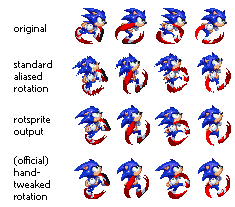
The result is so good that Asprite had incorporate it
And why not? He can configure it on a simple ondrawscript and call it in pretty much all entity he wants to. The good part of this is: it's non-destructive, because there is no actual change to the image and he can change the values if he want to until he is satisfied witht the result.And he wont use drawmethod in the entire game with all chars.
So, then, he can edit manually if he wants to.
I NEVER found myself more than anyone here, I have always done everything to help the community and the engine itself. A simple check in the help forum proves what I'm talking about, or even see the official engine manual. I use my little free time to help people as I can.masterderico said:And you always trying to be better than others.
I left to comment this part at the end of the text on purpose. This is not the first time you attack me and I pretend I do not see. I have already been informed by other members about of your fame and your way of being. I relayed this over and over again.
But I will not do it any more. You have every right not to like me, but respect is needed - especially when the person you attack, without reason, is an administrator.
You are suspended from this forum, thanks to the toxic conduct that you have shown, especially against me.
==========================================================
Back to the topic:
But you can resize by percentage, take a lookelisf2 said:Hey O Im using asesprite for the game I am making and I have the full version and I know I can rotate a sprite but is there a way in asesprite thag will let me scale a sprite by percentage to be bigger or smaller instead of having to do it by hand?

This is expected to happen. You can just reaply the palette or, if you use Aseprite, it will keep the palette intact.elisf2 said:I have when I use rotsprite or anyother software it scales it but I dosent retain the pallete
O thx for the help but I still dont understand sry for being a dumbass with computer I try to do it by percentage bug it resizes the canvas not the sprite im not even sure if im using the right terms lol do I have to select the sprite with the select tool then resize it by percentage? By the way I cant wait for your realse of avengers one of my fav games thx in advanxe for any help
O Ilusionista
Captain 100K
Not a prob. There are canvas size and sprite size. You need to choose sprite size.
O Ilusionista
Captain 100K
Have it worked for you?
Maybe you have a different version than me. This option is under SPRITE menu.
Maybe you have a different version than me. This option is under SPRITE menu.
O Ilusionista
Captain 100K
Thanks for the kind words  But I am just learning like all the others.
About the offset, its better to fix it on the image rather than change the offset on the character.
But I am just learning like all the others.About the offset, its better to fix it on the image rather than change the offset on the character.
O Ilusionista
Captain 100K
Because you can use the same offset for all the animations, which speed up the proccess 