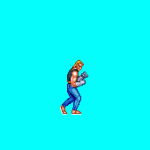
Char get a different color in the pink square index

huermen

New member
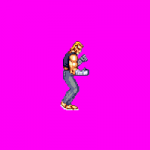
Hello good night friends, I noticed that my sprites are different in color when I paste in the pink square, using the Gimp. the image is in a different color and I've tried everything to improve it, please ask for help. hug friends!

Obs:

An example of how it looks different after being placed in the pink square using the original sprite and cut into the gimp.

Trad

Ola bom noite amigos , eu percebi que meus sprites ficam com a cor diferente quando eu colo no quadrado rosa, usando o Gimp. a imagem fica com a cor diferente e já tentei de tudo pra melhorar, peço ajuda por favor. abraço amigos!

Obs:
Um exemplo de como fica com a cor diferente depois de ser colocado no quadrado rosa usando o sprite original e cortado no gimp.
 

Attachments

  • idle.png
    idle.png
    5.2 KB · Views: 5
  • idle01.gif
    idle01.gif
    833 bytes · Views: 3
Hello there :)

I believe you also applied a palette when pasting pink square. That's why the png loses some color and instead gets color replacement based on palette

I'm not sure why you applied that palette before but if you only want to change blue background color, all you need to do is open the palette and change that blue color
Hmmm.... maybe I should ask, what is actually you're trying to make?
 
huermen
using gimp is fine, but tell it to apply an alpha channel to your images & export them as .PNG

after that , run them trough http://www.chronocrash.com/forum/index.php?topic=4474.msg69378#new

Palapply, because gimp sometimes gives weird results ina frame or 2, even if you convert to indexed
 
Bloodbane said:
Hello there :)

I believe you also applied a palette when pasting pink square. That's why the png loses some color and instead gets color replacement based on palette

I'm not sure why you applied that palette before but if you only want to change blue background color, all you need to do is open the palette and change that blue color
Hmmm.... maybe I should ask, what is actually you're trying to make?

when i try to create a char, its image is with the strange color, it doesn’t have the original color. even if I change the color of the pink square, it still has no quality
 
oldyz said:
huermen
using gimp is fine, but tell it to apply an alpha channel to your images & export them as .PNG

after that , run them trough http://www.chronocrash.com/forum/index.php?topic=4474.msg69378#new

Palapply, because gimp sometimes gives weird results ina frame or 2, even if you convert to indexed


thks friend!
I downloaded palapply-v2-2.0.3 but how do I use the sprites on it?
 
Bloodbane said:
So let me clarify, you have sprites of this character but you don't like his color set. You want to change it with GIMP right?


I wanted to create the character with the quality of the cropped image, an image etc, but it is no longer quality when I cut and paste it in the pink square.
 
but it is no longer quality when I cut and paste it in the pink square

Ah, now I understand  :)

Pink square = sheet with pink background

Pasting to sheet with palette will cause pasted image to lose colors because it has to be adjusted to fit sheet's palette
Next time, you need to create new sheet with no palette or in RGB mode :)

HTH
 
Back
Top Bottom