Chronocrash Modders Tools

ChronoCrash Modders Tools 0.7.9.10.1

No permission to download
Will work on it, thanks!
BTW if you know HTML you can use it, with inline styling.

Example :

Code:
'''<div>Blabla <span style="color:red;">this part is in red</span> blabla</div>
<div>blabla <b>this part is in bold</b></div>'''

Of course you can also use plain text, but just to let you know that you can also use HTML if you want.
 
Hey Piccolo, I am using CMT to make my game and today I had an issue with it.

I've made a type none entity to make different animations on a stage, and I just copied a previous entity and changed the frames and such.
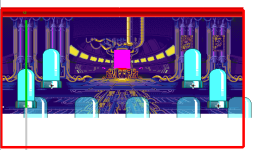
When I try to preview the level, I can't see the entity:

1699807553276.png

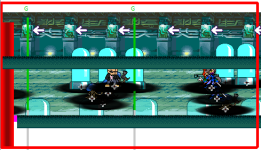
It's weird because the previous entity I used as a base do show up on another stage (marked with a white arrow):
1699807730119.png

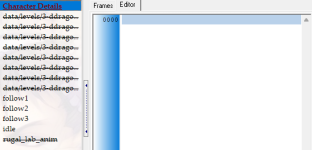
and looks like CMT, somehow, screwed up the file format, because if you try to open it on Stats, you will see this:
1699807828181.png
The entity header isn't recognized by the tool and it lists the frames as animations.


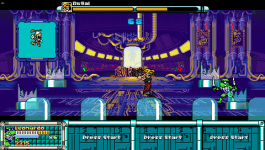
But the entity works fine in game (the big screen, the capsule at back, the lights at back and the panel lights are all the same entity, spawned into different animations):

pdc - 0057.png

Any clue?

I am attaching the entity here if you wanna take a look
 

Attachments

Hey Piccolo, I am using CMT to make my game and today I had an issue with it.

I've made a type none entity to make different animations on a stage, and I just copied a previous entity and changed the frames and such.
When I try to preview the level, I can't see the entity:

View attachment 5685

It's weird because the previous entity I used as a base do show up on another stage (marked with a white arrow):
View attachment 5686

and looks like CMT, somehow, screwed up the file format, because if you try to open it on Stats, you will see this:
View attachment 5687
The entity header isn't recognized by the tool and it lists the frames as animations.


But the entity works fine in game (the big screen, the capsule at back, the lights at back and the panel lights are all the same entity, spawned into different animations):

View attachment 5684

Any clue?

I am attaching the entity here if you wanna take a look

Hi, there is not indentation on the frames of idle animation.
When you copy pasted you probably forgot indentation.

Bad :
Code:
anim    idle
    loop    1
    delay    16
    offset    0 200
frame data/levels/3-ddragon_rugal_lab/rugal_lab_anim_10.gif
frame data/levels/3-ddragon_rugal_lab/rugal_lab_anim_11.gif
frame data/levels/3-ddragon_rugal_lab/rugal_lab_anim_12.gif
frame data/levels/3-ddragon_rugal_lab/rugal_lab_anim_11.gif


Good
Code:
anim    idle
    loop    1
    delay    16
    offset    0 200
    frame data/levels/3-ddragon_rugal_lab/rugal_lab_anim_10.gif
    frame data/levels/3-ddragon_rugal_lab/rugal_lab_anim_11.gif
    frame data/levels/3-ddragon_rugal_lab/rugal_lab_anim_12.gif
    frame data/levels/3-ddragon_rugal_lab/rugal_lab_anim_11.gif
 
Can the tool do it on its own ( i mean you know autocheck before loading)to fix that in all animations ? Maybe a separate tab "fix indents" or something.
Does this tool have bor packer ? so we can just pack the game to pak file ? i see char packer but it errors out
IT would also be nice if it had wav2bor support built in to batch the music conversion, hm i think ill make my gui for both of those
 
Last edited:
IT would also be nice if it had wav2bor support built in to batch the music conversion,
I think almost nobody is using .bor anymore (or should be using it).
OGG is the way to go - smaller files and easy to handle.
I use this method for years and works like a charm Fast .OGG Conversion with OGGENC2

Hi, there is not indentation on the frames of idle animation.
Yeah, that was the issue. Thanks!
(Although stats can't open that file anymore)

Something that I notice: the stage preview shows the X and Z position of the enemies on the stage, but it ignores the Y position (iow, it always displays the entity on the ground).
Its something easy to fix?
 
Can the tool do it on its own ( i mean you know autocheck before loading)to fix that in all animations ? Maybe a separate tab "fix indents" or something.
Does this tool have bor packer ? so we can just pack the game to pak file ? i see char packer but it errors out
IT would also be nice if it had wav2bor support built in to batch the music conversion, hm i think ill make my gui for both of those
I could add it in a separate manual button to fix indents yes. I don't like to do automatic changes to user files, you never know for sure if you are not going to change something the user wanted to be like it was, not to mention there's a risk of messing files if you don't anticipate all risks in the code.

The "prepare PAK" was actually a cleaning tool for my mod, I think no one used it other than me. Basically what it did was creating a copy of chars folder with only the files that are actually used in the game.
 
(Although stats can't open that file anymore)
Hum strange, maybe stats doesn't recognize files with specific indentation or something.

Something that I notice: the stage preview shows the X and Z position of the enemies on the stage, but it ignores the Y position (iow, it always displays the entity on the ground).
Its something easy to fix?
Yeah it's an easy fix, I actually remember that some part of the tool use "Y" position. The binding GUI I suppose.
 
I could add it in a separate manual button to fix indents yes. I don't like to do automatic changes to user files, you never know for sure if you are not going to change something the user wanted to be like it was,
Same as you, I think that a separate button is the way to go. I can't say about other people but in my case after some time I ended up creating my own way to organize codes for a better reading/editing. This was the main reason I quitted using OpenborStats, if I'm not wrong this tool changes even the animation order.
 
if I'm not wrong this tool changes even the animation order.
Yes, it will order the animations alphabetically. And this is where the corrupts can occur.
Plus, it deletes comments that aren't made on script lines, palettes paths or in the animation names.

Yeah it's an easy fix, I actually remember that some part of the tool use "Y" position. The binding GUI I suppose.
Cool! ObEditor was the only editor which displays Y position on stages. And I remember it has a cool drag an drop feature:
- drag the character shadow and you can move the entity in Z plane up or down
- drag the character itself and you can move the entity in Y axis up or down.

it was very useful. But sometimes it stops reading projects and if the stage has scritps, it screws up some positions.
 
I had some delays in the past when using ogg so , id have to test it but anyways heres gui that you place in same folder with packer.exe and wav2bor.exe, change txt extension to bat , it also downloads ffmpeg to convert from aac or mp3 to bor if you want to.

I get that some peopl dont use bor anymore but having all bor packers unpackers and music converter in one tool would be nice

Are we able to drag character with mouse to change his offset ? I cant do it .

I noticed in stages that we panel is set to AAAA then it still displays just one copy of that panel
 

Attachments

You can drag entities in level editor.

In Entity editor there's a set offset button, above the sprite, on the left. You click on it and then you click where you want the offset to be.
 
yeah id need a noob course , ill hit youtube maybe there is something

Ok imo when we click set offset , it wold be nice if cursor would become + for this , a hand is hard to tell where is the middle

One nice thing would be highlighting actually selected frame in text data window when we click on frames of animation so we can see what frame are we on in the text data itself , maybe red or something, i see theres a gray thingy already but its so dull and wont jump when i click on frames thenmselves
 
Last edited:
yeah id need a noob course , ill hit youtube maybe there is something

Ok imo when we click set offset , it wold be nice if cursor would become + for this , a hand is hard to tell where is the middle

One nice thing would be highlighting actually selected frame in text data window when we click on frames of animation so we can see what frame are we on in the text data itself , maybe red or something, i see theres a gray thingy already but its so dull and wont jump when i click on frames thenmselves
Interestingly the highlighting part is in the code but no longer works for some reason. I'll look into it. The color was still "gray" though.

For the set offset cross cursor yes it is an easy fix.
 
I think almost nobody is using .bor anymore (or should be using it).
I do use .bor files for my mods too though, but not all of them for my projects. I use .ogg too. But I use all BOR formatted files for my ROD since it's kinda classic. I know it's tricky to loop them, but I like making loops of 'em. I know converting to .ogg is easier than .bor due to its file size compression.

Plus, it deletes comments that aren't made on script lines, palettes paths or in the animation names.
This is why I stopped using OpenBORStats early when I jumped to CMT for my SF project. I needed comments especially for leaving notes for use.

Hey Piccolo. I don't know how I could explain this. I encountered an error when I opened my saved character file after using CMT. But it looked completely blank with all spaces but there was a hundred KB or less, making us think it got full before we opened it to realize it's all blank. Unwanted spaces exist. I don't know how that happened. It happens to me sometimes. Is it because I left the program open for way too long?
 
You can drag entities in level editor.
ah cool! I remember last time I tried it wasn't working, but now it works :)

I know it's tricky to loop them, but I like making loops of 'em.
not wanting to derail the topic, but its easy to do the same with ogg - in fact, it's easier.
Unless you want to develop to some old legacy ports which didn't accepts .ogg, there isn't any advantage of using .bor files.

I rememeber there was an old bug where you were oblied to keep remix.bor and menu.bor (I think?) on the folder or the engine didn't played anything at all, ignoring the same file names with .ogg. But it was fixed long time ago (I think it was 4420).
 
Yeah it's an easy fix, I actually remember that some part of the tool use "Y" position. The binding GUI I suppose.
Sorry, I was using both tools at the same time (so I can copy things from one project to another) and I mixed both: CMT DO display the entities on the right Y axis.
Sorry about the confusion.
 
Hey Piccolo. I don't know how I could explain this. I encountered an error when I opened my saved character file after using CMT. But it looked completely blank with all spaces but there was a hundred KB or less, making us think it got full before we opened it to realize it's all blank. Unwanted spaces exist. I don't know how that happened. It happens to me sometimes. Is it because I left the program open for way too long?
Hey, I don't really understand. You saved a character file in CMT and then when you opened it again it was empty ?
 
Back
Top Bottom