Chronocrash Modders Tools

ChronoCrash Modders Tools 0.7.9.10.1

No permission to download
Don't hate me, please :)
Lol. Yeah this thing is not up to date and need some cleaning. I just cleaned most of it, will do the rest later, will work in next version.

I used this back in the day to both generate HTML browsable move list + ingame browsable movelist.
 
Piccolo updated Chronocrash Modders Tools with a new update entry:

Changelog 0.4.6.6

In Edit -> Settings -> Editor :
- you can now change the color of the highlighted line of editors to the color you want @bWWd
- you can now set if you want long lines to wrap in current view (default) or if your prefer to scroll horizontally without wrapping @O Ilusionista

Entity Editor
- Selecting a frame sprite will now not only change the cursor to corresponding frame line in text view, but also highlight the line @bWWd

Level Editor
-...

Read the rest of this update entry...
 
I tested it, it works but it highlights sounds ,offsets, sometimes other various things , can you lock it to only highlight lines with "frame" word ?
 
I tested it, it works but it highlights sounds ,offsets, sometimes other various things , can you lock it to only highlight lines with "frame" word ?
Yeah normally it highlights only frames but when some of the lines are too long and wrapped I get the wrong number. You'll notice it always highlights frames lines if the window is large enough.

So yeah I'll need to figure a way to compute the actual row number of frames lines even when lines are wrapped

EDIT : ok I just fixed this in the code, the fix will be available in next update.
 
Last edited:
  • Like
Reactions: ABK
Hey Piccolo, I was reading the update notes while I saw this:
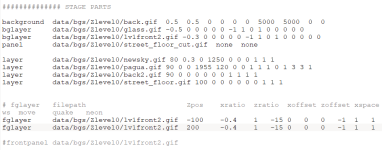
"background and bglayers are now properly set behind fglayers, even when fglayers have negative Z positionning"

This could be problematic. Background is the bottom most layer we have, but not bglayers. And you can have fglayers to be draw behind bglayers (yeah, "bglayer" and "fglayer" names can be misleading, but internally everything is a fglayer).

The sole difference between bglayers and fglayer is Z depth control. Bglayers z position cannot be modified (they assume a default value, as frontpanel, background, etc does), but you can fine control the Z position of a fglayer and they can either be behind a bglayer or in front of a frontpanel - the only thing you cannot do is draw them behing the background.

BGLAYER is an alias for FGLAYER, minus the Z depth control. We also have another alias: LAYER.
If I am not mistaken, its another alias for FGLAYER but with Z depth control (and honestly, "layer" would make more sense over "fglayer", because the latter implies that its set in the foreground)
 
FYI. The reason for those weird name conventions is "fglayer" came last. It's also why we can't change them. It would be a huge compatibility break. I might do it anyway in the future, but not the next release.

DC
 
Hey Piccolo, I was reading the update notes while I saw this:
"background and bglayers are now properly set behind fglayers, even when fglayers have negative Z positionning"

This could be problematic. Background is the bottom most layer we have, but not bglayers. And you can have fglayers to be draw behind bglayers (yeah, "bglayer" and "fglayer" names can be misleading, but internally everything is a fglayer).

The sole difference between bglayers and fglayer is Z depth control. Bglayers z position cannot be modified (they assume a default value, as frontpanel, background, etc does), but you can fine control the Z position of a fglayer and they can either be behind a bglayer or in front of a frontpanel - the only thing you cannot do is draw them behing the background.

BGLAYER is an alias for FGLAYER, minus the Z depth control. We also have another alias: LAYER.
If I am not mistaken, its another alias for FGLAYER but with Z depth control (and honestly, "layer" would make more sense over "fglayer", because the latter implies that its set in the foreground)
So basically "background" should have the most negative Z value, and "bglayer" should have "0" ?
 
I might do it anyway in the future, but not the next release.
ah, honestly I don't think its necessary - it would do more harm than good. And I think "layer" would make more sense, from a semantics point of view, since it doesn't assume position.

So basically "background" should have the most negative Z value, and "bglayer" should have "0" ?
Background should the the most negative Z value as nothing can get behind it. Bgtlayer could have the default Z value - I can't remember its default value, maybe @DCurrent can give us a help here.
 
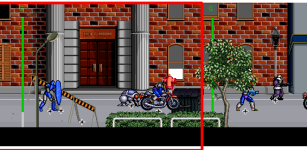
Btw, I've tried to open a stage which uses "layer" and looks like some layers are missing:
1700227736964.png

If you wanna see it in action, grab my Avengers game and open a staged named "street_1_branch.txt".
Back in the day, I had to use "layer" to achieve the complex mirror setting this stage uses - the mirror affects only part of the stage, and not the whole area, without using screens.

1700227932868.png
 
@Piccolo,

Not exactly. See, default Z position of layers (and objects) aren't actually hard-coded. They use a formula based on the allowed Z walkable area of a stage, and then a hardcoded adjustmentfrom from there. That's why it can seem so inconsistent to work with them.

Background is furtherest back, then bglayer/layer (in order of definition), then panel, object layer, fglayer, frontpanel, and finally HUD. However, fglayer has a creator Z adjustment it adds to the initial Z position, and using negative numbers you can put it back far as you want.

It is possible to go behind the Background or in front of the HUD, you just have to really huge adjustments. All axis values in OpenBOR are 32bit signed ints, so the possible range is -2.4 billion to 2.4 billion.

I'll have to go into the source a dig up the formula and initial adjustment values.

DC
 
Last edited:
It is possible to go behind the Background or in front of the HUD, you just have to really huge adjustments
ah I was aware of being able to go in front of HUD (I use this on my games to cover the hud), but I wasn't aware that you could go behind the background. Thanks for the info :)

----

Piccolo, how the Project selector works?
I am amazed how fast it works, as I can jump from one project to another to copy things, while Stats had to reload everything each time.

But I've noticed that some stuff had been cached and aren't displayed correctly. I was able to take some shots to show you:

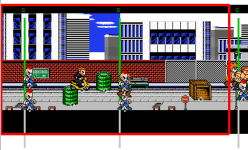
- The large green barrels of oil are called "DRUM".

Captura de tela 2023-11-17 104355.png

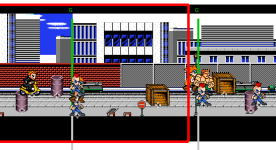
However, in another project, I have an entity with the same name, but using other graphics.
drum.gif

When I jump from one project to another, the tool displays the graphics from the other project:
Captura de tela 2023-11-17 104328.png
 
Piccolo, how the Project selector works?
I am amazed how fast it works, as I can jump from one project to another to copy things, while Stats had to reload everything each time.

But I've noticed that some stuff had been cached and aren't displayed correctly. I was able to take some shots to show you

I think it only loads what is necessary, that's why it's fast. Then everything else is loaded on the fly the first time they are needed, and cached to be used even faster the second times they are needed. It's a bit like the difference between "load" and "know" in OpenBOR. In CMT basically everything works like "know".

This is why the barrel ends up wrongly displayed. It's not that the model itself is not replaced because it is, it has more to do with the path of the sprites. In both games the relative path of the barrel sprite is probably the same, and right now CMT doesn't clean the sprites cache when switching from one project to the next.

I can easily fix this though. By either clearing the sprites cache when switching project, or indexing the sprites cache with absolute paths (project_path/data/chars/...) instead of relative paths (data/chars/...).
 
Last edited:
In both games the relative path of the barrel sprite is probably the same,

I've checked and they doesn't have the same path, just the same model file name:

load Drum data/chars/misc/drum.txt
know Drum data/chars/misc/objects/drum.txt

I can easily fix this though. By either clearing the sprites cache when switching project, or indexing the sprites cache with absolute paths instead of relative paths.
If this will impact the speed, maybe you can add the option to user to force the sprite reload, as you have on the animation tab?
 
I've checked and they doesn't have the same path, just the same model file name:

load Drum data/chars/misc/drum.txt
know Drum data/chars/misc/objects/drum.txt


If this will impact the speed, maybe you can add the option to user to force the sprite reload, as you have on the animation tab?
I mean the paths of the sprites, not the models

And yes I can add an option to force reload, even if on a SSD the speed impact is negligible.

But I'll probably go with the second option and index the sprites by project, so no clearing needed.
 
Ok that's weird, I'll check to see if I can reproduce this.

Actually you were right, in level editor entities are cached, so yeah when switching project it kept the model from the first game.

I'll make every cache project specific so it will fix all these problems.
 
@Piccolo,

I just went through the source code to get layering formulas. Hopefully didn't miss anything. First, I was mistaken above. The Background (and bglayers) are hardcoded to the minimum possible integer value (so @O Ilusionista is correct, you can't go behind the background). Technically, you can match the background, but it will still always appear behind due to the drawing routine (see below). Also, fglayers default in front of the frontpanel, not behind it.

These are the constants used to apply adjustment. PLAYER_MIN_Z and PLAYER_MAX_Z are the walkable Z areas creators can set per level.

C:
int PLAYER_MIN_Z = 160;
int PLAYER_MAX_Z = 232;

#define MIN_INT (int)0x80000000
#define MAX_INT    (int)0x7fffffff

#define FRONTPANEL_Z    (PLAYER_MAX_Z+50)
#define    HUD_Z           (FRONTPANEL_Z+10000)
#define HOLE_Z          (PLAYER_MIN_Z-46)
#define SHADOW_Z        (PLAYER_MIN_Z-47)
#define NEONPANEL_Z     (PLAYER_MIN_Z-48)
#define SCREENPANEL_Z   (PLAYER_MIN_Z-49)
#define PANEL_Z         (PLAYER_MIN_Z-50)
#define MIRROR_Z        (PLAYER_MIN_Z-5)

Z layering adjustments (in default order back to front):

BackgroundMIN_INT
bglayerMIN_INT
WaterMIN_INT+1
PanelPANEL_Z
Screen (Alpha Panel)SCREENPANEL_Z
NeonNEONPANEL_Z
MirrorMIRROR_Z
ShadowsSHADOW_Z
HolesHOLE_Z
Object LayerPLAYER_MIN_Z to PLAYER_MAX_Z
FrontpanelFRONTPANEL_Z
fglayer{z argument} + FRONTPANEL_Z
HUDHUD_Z

As you can see, the Background and bglayers all occupy the same Z layer by design, and unless you adjust them, all fglayers are on the same Z layer as well. As with most drawing routines, OpenBOR's caches objects in order of existence, so the last one always "wins". There's a lot of stuff going on and it's really old code, but far as I can tell at glance, background and panels read first, then everything else in order of definition.

All objects are part of the same layering. Entity Z layer is based on their current Z axis position. Entities also have a manual Z adjustment (default 0), and a couple of other internal adjustments (ex. binding layer). These all combined control where entities fall in the above table. If two entities somehow occupy the exact same Z position, the last one wins as usual. However, since the entity cache is constantly rotating, the last one drawn differ one update to another, causing flicker.

HTH,
DC

 
Last edited:
Back
Top Bottom