
You are using an out of date browser. It may not display this or other websites correctly.
You should upgrade or use an alternative browser.
You should upgrade or use an alternative browser.

ChronoCrash Modders Tools 0.7.11.2
No permission to download
- Thread starter Piccolo
- Start date

O Ilusionista
Captain 100K
It's not an app, he is doing this inside the engine itself.What app is that?

Piccolo
Well-known member
As I said earlier, I can add this but there is a huge drawback to adding entities visually : you don't interact with the spawn order. The engine reads the level file from line 1 to last line. It doesn't read it "visually" from left to right. And the sequence of spawned entities does not match the visual order of entities.would you consider to add spawn entity in level editor,
this way designing the stage will be easier when there is a visual
Being forced to add entities in the text content of level file forces you to be aware of spawn sequence, it forces you to understand how the level works logically so to say.
So to me it's way better to first add spawned entities "logically", that is to say in text content. And then adjust their position (coords) visually with visual editor.
I can see newbies having a lot of issues understanding how levels works if you give them a visual editor that let them add entities.
And even if I were to add a visual editor to edit spawn order, it would basically look a lot like what you have in text content : a linear sequence of command "blocks". And when spawning an entity visually, the user would have to choose where he wants to insert the entity not only in the visual space (coords), but also in the spawn sequence. You can not just get by with coords.
Last edited:

machok
Well-known member
I apologize if I don't understand what you mean. but spawn "at" can't sort the visual sequence?but there is a huge drawback to adding entities visually : you don't interact with the spawn order. The engine reads the level file from line 1 to last line. It doesn't read it "visually" from left to right. And the sequence of spawned entities does not match the visual order of entities
Piccolo
Well-known member
You have basically three elements to take in consideration :I apologize if I don't understand what you mean. but spawn "at" can't sort the visual sequence?
- coords (the least important)
- at (second least important)
- spawn order (most important)
Visual editor is good for coords. For "at" it's not really good. And for spawn order it doesn't even handle it, it would need a special feature to handle it.
To give you a concrete example, let's say you have a completed level. But you want to add an enemy entity at the start of the level. You go in visual editor, you drag and drop the new entity at the start of the level. Then you test the level and you don't understand why the new entity doesn't show up. It doesn't show up because even though its coords are indeed at the start of the level its spawn order is probably at the end of the file. So it won't be spawned until the "spawn" sequence reaches the end.
Again there's no way around it with just a visual editor. You need at least a feature to view/edit spawn sequence, and raw text is pretty good at that.
When spawning an entity, spawn sequence is what you have to consider first. So it doesn't really make sense to first spawn entities visually based on their space coords.
O Ilusionista
Captain 100K
@Piccolo maybe I have a idea for making things easier to see.
Would be possible to make the tool to display only the entities related to the current wait?
Kinda like we have "tint by group" but something as "hide by group" option.
Even with tint (which is great), things can start to be kinda chaotic when you have too much entities

On the image above, for example, it would display only the entities colored in green, while all the others would be hidden.
Would be possible to make the tool to display only the entities related to the current wait?
Kinda like we have "tint by group" but something as "hide by group" option.
Even with tint (which is great), things can start to be kinda chaotic when you have too much entities
On the image above, for example, it would display only the entities colored in green, while all the others would be hidden.
O Ilusionista
Captain 100K
Some tips I use to develop my stages:I apologize if I don't understand what you mean. but spawn "at" can't sort the visual sequence?
- before starting to place the entities, I calculate how many waits I want in the level (bWWd was making an incredible tool for this and you can run it inside CMT). For this, I use a basic calculation of "total size of the panel image (or their sum, if you use multiple panels) / width of its resolution".
So if I had a 2400px image, I would have 5 waits on a 480x272 game. But it would only work like this if I wanted the player to be able to move the camera the same width as my game - and sometimes I want that, sometimes I don't. I just avoid leaving waits too close to each other: I always try to use an interval of at least 150px between them (generally, I use resolution width / 2).
- Once you've decided how many waits, place just one enemy in each wait (you can set their health to 5, so they can die with a single attack), so you can test the flow of your level. This way you can feel how the level progresses, if there are very short or very long pauses, etc. Because the more entities you place on a level, the more difficult it becomes to deal with.
Piccolo
Well-known member
Yes it's a good idea. Probably not as default though, because some users would be confused not to see all the enemies. But yeah with buttons similar to the buttons to cycle through waits.@Piccolo maybe I have a idea for making things easier to see.
Would be possible to make the tool to display only the entities related to the current wait?
Kinda like we have "tint by group" but something as "hide by group" option.
Even with tint (which is great), things can start to be kinda chaotic when you have too much entities
On the image above, for example, it would display only the entities colored in green, while all the others would be hidden.
Maybe instead of hiding the entities entirely it would be better to make them almost transparent (like 20% opacity or something like that). I'll try both and see what looks best.
O Ilusionista
Captain 100K
oh, for sure not as default! it could be an option kinda like "tinty by group".Probably not as default though, because some users would be confused not to see all the enemies.
and once active, if you cycle through the waits, it would automatically hide/unhide the proper entities.
O Ilusionista
Captain 100K
Piccolo
Well-known member
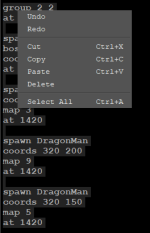
Yeah, in the meantime "Ctrl + D" should do exactly that. And "Ctrl + Shift + D" = Uncomment.@Piccolo A little suggestion: would it be possible to add "comment all lines" on the right click menu?
So it would add a comment with "#" at the start of each selected line
View attachment 6743
bug:
frame data/chars/mud/mudfroz (1).png
frame data/chars/mud/mudfroz1.png
The one on top wont show up at all anywhere ,the one on bottom does, andits just the same pic renamed
Also please add button RELOAD ALL, so it will reload everything, models, sprites - everything.
frame data/chars/mud/mudfroz (1).png
frame data/chars/mud/mudfroz1.png
The one on top wont show up at all anywhere ,the one on bottom does, andits just the same pic renamed
Also please add button RELOAD ALL, so it will reload everything, models, sprites - everything.
Piccolo
Well-known member
It's because of the space. Does OpenBOR allow spaces in filenames ? I think it's a bad idea anyway because spaces are basically parameters separator anywhere else, and there is no quotes to escape spaces. Every time CMT sees a space (expect within comments and scripts), it considers that it is a separator.bug:
frame data/chars/mud/mudfroz (1).png
frame data/chars/mud/mudfroz1.png
The one on top wont show up at all anywhere ,the one on bottom does, andits just the same pic renamed
Also please add button RELOAD ALL, so it will reload everything, models, sprites - everything.
So this command "frame data/chars/mud/mudfroz (1).png" is like a "frame" command with two parameters (first parameter is "data/chars/mud/mudfroz", and second is "(1).png"
O Ilusionista
Captain 100K
I second that. Sometimes I need to quit and start the tool again to be sure it had reloaded everything.Also please add button RELOAD ALL, so it will reload everything, models, sprites - everything.
Specially when you edit the models.txt inside it (which is great, thanks to the color synthax).
Still talking about reloading, I noticed that the program seems to store information in a cache, which is difficult to clear. And certain information, like the icon in the entity list, is very difficult to update.
I haven't tested it in the latest version, but here's a step-by-step guide on how to reproduce this:
- Let's say you have the Ryu entity in data/chars/ryu/ryu.txt
- make a copy of it, renaming the name RYU in the header to KEN, but point it in models.txt to the same file (I know this is wrong, but it is an error that can happen).
- Load the project into CMT and you will see the KEN entity using Ryu's icon (as expected)
- But now edit the models and point the same KEN entity to another file - you can make a copy of Ryu's file, changing the name to Ken), where you place the correct Ken icon
- As soon as you load the project again, the tool will still show the Ryu icon. You will need to close the tool several times until it updates.
no. They are parameters separator. And this is universal in pretty much everything, including your OS.It's because of the space. Does OpenBOR allow spaces in filenames ?
(Just try to use a recovery tool on files with spaces or special characters...good luck with that. Only the ones who lost files thanks to that knows the pain, lol)
O Ilusionista
Captain 100K
@Piccolo something I forgot to report: there is an strange behaviour on how CMT display an entity axis in the stage editor once you change its Y position.
Take a look at this video - once I changed its Y position one time, if I change its X position, the axis starts to move up on the screen each time I do this.
Take a look at this video - once I changed its Y position one time, if I change its X position, the axis starts to move up on the screen each time I do this.
Piccolo
Well-known member
I just tried but can't seem to reproduce this issue@Piccolo something I forgot to report: there is an strange behaviour on how CMT display an entity axis in the stage editor once you change its Y position.
Take a look at this video - once I changed its Y position one time, if I change its X position, the axis starts to move up on the screen each time I do this.

O Ilusionista
Captain 100K
weird, maybe it happens only in windows? Because I can reproduce it in any entity, in any project.I just tried but can't seem to reproduce this issue
Piccolo
Well-known member
It's unlikely. But maybe I did some changes that affected that since last update. Doubt it but will check with the public buildweird, maybe it happens only in windows? Because I can reproduce it in any entity, in any project.
EDIT : Yeah it does indeed does that in the public build.
O Ilusionista
Captain 100K
as far as I remember, this happens since long time.... like when you was fixing the deltas in fglayers preview.It's unlikely. But maybe I did some changes that affected that since last update. Doubt it but will check with the public build
Piccolo
Well-known member
It doesn't happen in my dev environment, but it does happen in my public environment. I think it's probably related to some kind of setting, I'll check.as far as I remember, this happens since long time.... like when you was fixing the deltas in fglayers preview.