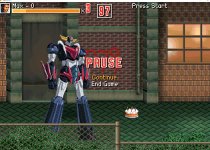
Convert HD Image into sprite

abulrezg

New member
Hi guys, im new to Opennbor development (years of playing OPENBOR Games)
and i thank you all for all the entertainment you gave to us
i decided to create a game of my own for super robots GRENDIZER-MAZINGER-VOLTRON-GETTER ROBO
i had an idea of creating the sprites by taking images to my action figures in many stances and create the moves and characters
however i started by doing a test of resizing one image to usable size of the default template game (Beats of Rage) which require the image to be nearly 150 px by 53 px
and i tried to sharp it in many way but the result is horrible
here is the image i used
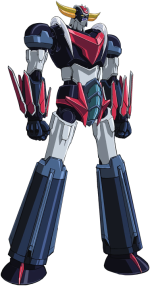
Grendizer_U_Mecha_Front_.png

here is the result::eek::eek::eek::eek:

Untitled-1.jpg


is there anyway to fix this
sorry if my question is basic or silly for some of you, but I'm just a beginner
and thanks again to all of you
 
Are you using the global palette (BOR's pal.act) as a palette for your character? If so, you shouldn't use the used global palette for all entities because that's gonna mess up your colors. You start again with the original image and resize it as you wish. Try saving an individual sprite with its own colors first without relying on BOR's global palette file. After attempting to fix your colors, you can grab another frame for your character but check if it either has the same color table as that one or is different from your previous one. If they have the same colors, then it's good. Sometimes, if it's different, they may not share the same color to one another. For example, Ryu (mostly in CVS form), with the first idle pose/sprite, doesn't show his teeth at all (unless it's Evil Ryu). It's got less than 16 colors because it doesn't show the color of his teeth. If you open one image that shows his teeth, you index it to check how many colors it has and that's 16 colors. Compare both images if their color table is the same or not. What you want most is to have your colors unified as a palette for your character. I open an image, go to the layer tab, and drag a sprite that has a color that's missing from the image I opened. Then, I start to index colors from all images I opened for a palette. Don't think too hard on this. It's just simple work. I usually drag all the sprites with the same colors into the layer tab for a palette after I open the very first one/sprite/image.

Which OpenBOR version/build are you currently using for this? The reason I ask about this is the use of colourdepth in video.txt before it became no longer usable in a certain build around early year 2017.
 
Thank you very much, im using the latest release (download it yesterday) build 4.0 Build 7735
i will take nearly hundred picture for each action figure, i need to make sure all the colors will be visible on the image.
but does this also include the image with a weapon or special moves?, i mean if the character is firing a beam does the colors of this beam need to be included in this master color pallete file? if the beam is included within the character image?
 
but does this also include the image with a weapon or special moves?, i mean if the character is firing a beam does the colors of this beam need to be included in this master color pallete file? if the beam is included within the character image?

You don't want particle effects and other sorts of things like that baked into the main sprite. It is better to spawn them as separate entities. This has a lot of benefits, including giving them their own color palette.

DC
 
Back
Top Bottom