do items just not show up if it's a long stage (4000+ on y axis)?

Hi.
I'm creating a side scrolling stage that goes along quite a ways.
I spawn all the 'none' items in the backgrounds, like flickering lights; neon signs; window reflection and stuff like that.
While testing this, I run along the entire distance of the stage and I find that the things that are supposed to be spawned at the other end are just invisible.

So, I rarely come here because I find I can eventually figure out the problem from other openbor projects (I've unpacked.. don't worry I'm not stealing your contents I'm just learning through examples of other coding), but I would like to know 'why' this is happening.

Because, I can't see it being a memory issue. The openbor log says there is still plenty of memory left when it is running. I'm using .gifs and not .bmps (because I believe gifs use less memory).

Coding and designing on openbor is a strange experience. I don't come across nearly as many problems programming rpgs on ruby. But I suppose rpg's can be somewhat simpler with less mechanics.
 
If you spawn the objects (if different) at the end of the stage at the beginning do they appear?

It might be default offscreenkill problem, you might be spawning things way out of range, for example if you have a stage that's really long like 10,000 pixels long you'll need smarter ways to spawn your objects like spawning when the playable character reaches a certain point of the stage or invisible entity spawn triggers

Spawning everything at the beginning won't work if your stage is longer than the default spawning rage. I forget numbers but have a look at adding offscreenkill 4000 to your entities or spawn triggers, I have no idea how your stage is set up so I'm just guessing.
 
I think your thread could be useful for us to cover several points at once - which is why we always encourage people to use the forum rather than other platforms.

Some points we can address:

1- "on y axis?"
Perhaps there is confusion between the axes, which is normal.
The X and Y measurements of an image in Photoshop, for example, refer to the X and Z axes within the engine (for levels - camera still use X and Y), and not to the X and Y axes.

OpenBOR works with 3 axes and 4 "dimensions":
X - Width (left and right)
Z - depth (what appears to be up and down in the image, but is actually moving closer or further away from the camera)
B - Base, where (where the character touches the "ground")
Y - Distance between the base and the point, in the air, where the entity is.

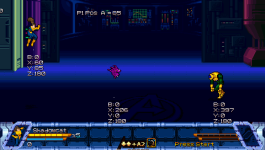
Notice the image below - the "B" and "Y" value for the Shadowcat are the same, but the platform on the right has the "B" value as 0 and "Y" as 300. As the platform moves, its Y value changes, but its B value does not.
Ox3OhxP.gif


and why this happens? Because the base of the platform (where its axis is located) does not change, what changes is its position in the air. As the following image shows, even though the platform is "in the air", it is not placed on top of anything, but directly on the ground ("B"). The other elements are on platforms:

cRBHZNz.png


2 - "do items just not show up if it's a long stage?"

As Danno explained, there is a setting called offscreenkill, which determines how many pixels an entity can be offscreen before being removed. Each entity type has a default value, but they all have a value (even if you don't provide it). For entities of type none, it would be 1000 pixels. This was implemented to save memory because, in most cases, you walk from one side to the other in a level and don't return to the beginning, so entities that are off the screen will no longer be useful.

offscreenkill {value}

  • Determines how far an entity could go offscreen before removed or killed instantly. For your information, OpenBoR kills entities which are too far offscreen to reduce number of active entities.
  • For example, projectiles and arrows are removed automatically by OpenBoR when they are 200 pixels offscreen. Doesn't matter which side they go offscreen to.
  • In levels which don't allow scrolling back, this is useful to remove unused entities which are left offscreen. However, in levels which allow scrolling back, you might need to set this to avoid entities being killed while you still need it.
  • {value} is distance in pixels measured from screen edges (left, right, up and down).
  • Default value for normal entities is 1000, for arrows and projectiles it's 200 and for bikers it's 300.

So, if you are spawning an entity that is more than 1000 pixels beyond the screen width (determined in the video.txt file, let's assume it is 480px), that entity will be removed instantly.

You could solve this by simply setting an offscreenkill value to something higher, like 4000. However, if your level is 4000px this will cause the entity to stay in memory for the entire level. In most cases, this won't be a real problem - you'll just be using more memory than you need.

Extra point - level limits

The X and Z limits that an entity can walk in a level are controlled by offscreenkill and minz / maxz and, once modified, the entity can move freely in these axes.

However, for the Y and B axes, it is a different conversation. I don't remember exactly what the value is (from my tests, it seems to be 3200px), but if an entity passes a Y limit in the air, the engine removes it. Most likely, the engine uses a calculation of the difference between your Y and B position in the level.

A simple way to test this is to add this code to your character's idle and watch him fly towards the sky... until it is removed:

C-like:
@script
     void self = getlocalvar("self");
     changeentityproperty(self,"subject_to_gravity",0);
changeentityproperty(self, "velocity", 0, 0, 10);
@end_script

Using a script to measure the Y position (which I still refer to as "a"), I can check that after 3200px the entity is removed


Avengers - 0033.pngAvengers - 0035.png
 
Last edited:
As others said, you're just running into a default behavior that is specifically designed to prevent the thing you are doing. If an entity goes a certain distance outside of the screen boundaries for any reason, the engine kills it instantly. No questions asked. And by killed I mean the technical version, as in deleted out of existence, not the in game "dead" condition.

That's one of the many dozens of things OpenBOR does for you that amateur creators just don't think of - resource cleanup. The default is more than generous enough enough to cover most needs, but obviously not 4000 pixels off screen. You just need to adjust the offscreen kill settings accordingly.

DC
 
Hi. Great responses. All 3.
Ummm, I haven't got the opportunity right this moment now to address all three. I hope it's alright if I just respond to the first person at this moment in time.

Danno, yeah I think it really is that simple.
Yesterday, I edited the stage so that I could run both ways. What I found was that on both extreme ends of the stage, the entities (which are just various backdrop decor to lighten up the visual feel) would disappear.
I suspect being on one end, the farmost right objects ceased to exist. When I ran all the way right, I then ran all the way left and the farmost left objects disappeared too.

Illusionista, I need to read your post a few times. you've given me lots of valuable information I may need time to digest it all.

DCurrent; that sounds like some 'behind-the-scenes' advanced level of programming happening at a GUI level or whatnot.

Python (and for that matter Ruby) are programs I'm learning to code whenever I can. Maybe in time these kinds of things will be easier to consider what goes on 'behind the scenes'.
 
Illusionista, I need to read your post a few times. you've given me lots of valuable information I may need time to digest it all.
Thanks :) I know we repeat this a lot, but I strongly suggest you (and everyone) to read the engine manual.
There are a lot of useful information there.
 
Back
Top Bottom