Does rangea properly work?

16-bit Fighter

Active member
If a target of an enemy or a NPC is small or in high level, rangea should be used like 0 30 for the small targets (in order to avoid a higher attack which wouldn't touch the adversary's bbox) and 100 200 for high ones, of course they are just some examples of values. However it seems not to work and Openborstats shows the rangea box can just start from the ground. The first value goes under the ground and the second one goes above. But I'd like a range box above the ground. I don't understand why rangea doesn't work as the two other range parameters which include negative values to be more efficient.

I hope I'm clear, it's kind of complicated to describe without pictures. ^^'
 
16-bit Fighter,

Rangea does work for above ground ranges. To be honest I'm not even sure what there is to explain. Just set the minimum heght and maximum height and that's it. The values are measured from entity's offset and anything between them is in range. You can use positive or negative numbers.

Don't rely on editors too much. They're good for saving some time, but none of them are finished or stable. Edit the range yourself, and use the engine's built in debugger to see your ranges live.

[Youtube]https://youtu.be/GpLQ--OATL0[/YouTube]

HTH,
DC
 
Thank you for your reassuring answers, guys. I make some tests again and I think I understand now what range is affected by. Bbox has nothing to do with range, it's just the position (x, y and z) that is involved. Thus rangea can't help about preventing a NPC from attacking a small enemy with a high attack, right?
 
16-bit Fighter said:
Thank you for your reassuring answers, guys. I make some tests again and I think I understand now what range is affected by. Bbox has nothing to do with range, it's just the position (x, y and z) that is involved. Thus rangea can't help about preventing a NPC from attacking a small enemy with a high attack, right?

16-bit Fighter,

I'm not exactly sure what you are trying to do. Here's a quick run down on the boxes and how they work.

  • Range: Range is mostly for AI (and the occasional script function, but don't worry about that now). It's how the AI determines if it should take an action, like attacking a hostile target, follow a parent, jump onto platforms, and so on. Let me be clear, it has NOTHING to do with what an attack can actually hit. It's just what the AI uses to decide if it will swing or not. There's one set of ranges per animation: Range (X axis), Rangea (Y axis), Rangez (Z axis), and Rangeb (base). Range is always checked on every axis. Any range you don't define just uses a default value.
  • Attack: Collision box that does the attacking. This has to touch a body box to have any effect.
  • Body (bbox): Collision box that detects incoming attacks. If there's no body box the entity can't be hit by non-scripted attacks, and the default AI won't try to attack even if target is in range.

So what you do is mix those up depending on what you are after. It's perfectly possible to give a attacks a huge range but tiny (or none at all) attack box - in which case the AI will swing stupidly at nothing. But you could take advantage of that to make some cool behaviors without script. Example: A boxer that randomly shuffles around. And naturally you can do the opposite, a small range but huge attack box. Or whatever else you want to do. If you give us some details I'm sure we can help out.

DC

 
Damon Caskey
Thanks for you explanations.

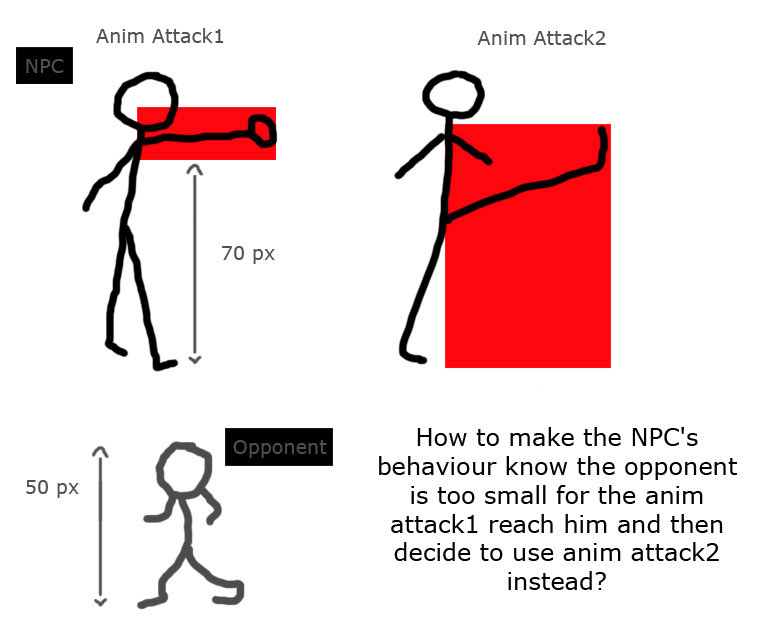
I hope this picture above will be clearer about what I want. With a default AI, the NPC peforms anim attack1 and anim attack2 against any opponent. But while facing a too small opponent, a optimized behaviour would be to perform only anim attack2.

sm0t.jpg
 
16-bit Fighter

If you want different attacks based on how tall someone is, range can't do that. Again, see my explanation of what range does above. All range tells you is if a target's position (where the offset is) falls within the range area. That's it. That's all.

What you are asking for requires two things: First, make sure you are defining the height property of your models. That's how the engine knows how tall a character is. Next, you'll need a script function to switch to switch attacks based on the height. It's very simple and easy to add. I'm on phone but can show you one later on if you need.

DC
 
For that, you will need script.
You would need to check for a target (findtarget), acquire the target height (assuming that you had set it) and them do the logic.
Because rangea works checking the entity a (or Y, better saying) position, not the character bbox.

edit: ninja'ed
 
Thanks you two, I got it! I made a successful test. In case it's not optimized, just tell me please. I think I'll have to add something to make the attack1 possible if the less-than-70-pixels-tall-opponent is not on the ground and therefore is reachable.

Code:
anim attack1
	range	0 33
	rangez	-10 10
	delay	9
	offset	74 102
	bbox	66 43 18 59
	@script
	void self = getlocalvar("self");
    	void target = findtarget(self);
    	int Theight = getentityproperty(target, "height");
    	if(Theight <= 70){
      performattack(self, openborconstant("ANI_ATTACK2"));
    }
	@end_script
        frame	data/chars/dhalsim/att101.png
        frame	data/chars/dhalsim/att102.png
        attack2  74 45 33 23 7 0 0 0 5 10 //
        frame	data/chars/dhalsim/att103.png
        attack  0 0 0 0 0 0
	frame	data/chars/dhalsim/idle01.png
 
That is it.
Remember that everything listed under HOSTILE is a valid target. If you don't set it, the engine will treat everything as a target (enemy, player, npc, obstacle, etc).
This is one of the methods to make moves that hit and grab do not work against obstacles - you exclude then from the Hostile setting.

If you set the desired HOSTILE (for example, enemy) and the engine finds a NPC, it will just move on to the next target.
So I was going to say to add a type check on your code, but the engine already does that on the findtarget() function :)

 
Nice script 16-bit fighter :)

I'm aware that you still need to add checks for enemy's altitude but I suggest adding frame check to the script, like this:
Code:
@script
  if(frame==0){
    void self = getlocalvar("self");
    void target = findtarget(self);
    int Theight = getentityproperty(target, "height");

    if(Theight <= 70){
      performattack(self, openborconstant("ANI_ATTACK2"));
    }
  }
@end_script

This will ensure that the animation change only occurs in 1st frame.
 
Yeah BB is right. While the code will trigger in the first frame anyway, if you don't add a frame check, the character will be able to change to the other attack any time during the first animation (for example, another enemy gets closer to you).

Plus, if the code needs to be run only on the first frame, don't make the engine work more than it should, because its a waste of resources. A minimum waste, but hey.
 
Back
Top Bottom