
You are using an out of date browser. It may not display this or other websites correctly.
You should upgrade or use an alternative browser.
You should upgrade or use an alternative browser.
global offset
- Thread starter Gurtag
- Start date


Actually there is. The drawmethod suite has centerx and centery that act as drawing offsets and will do what you are asking. Note in the case of entities both the frame and draw offsets apply.
That said, don't do it. You'll find yourself with more work in the long run. Any number of development studios or batch files could fix every file with one copy and paste operation.
DC
That said, don't do it. You'll find yourself with more work in the long run. Any number of development studios or batch files could fix every file with one copy and paste operation.
DC

O Ilusionista
Captain 100K
Gurtag said:i see, i am out of luck then :-[ , thanks a lot for the imput guys
No, you are not

You can open the character text file in any text editor and do a find and replace to change the offset.
And if you need to do this in many files at once, you can use free tools like Notepad++ which will let you change this in all the files at once.

Gurtag
Member
yea i use a lot notepad++ but find and replace would still take a lot of time since most of the values i want change are diferent between them, anyway after some test i am not sure about doing it any more, i was trying to better aling fallen enemy bodies to the ground so they better mach their shadows but cant find the right spot
Gurtag said:yea i use a lot notepad++ but find and replace would still take a lot of time since most of the values i want change are diferent between them, anyway after some test i am not sure about doing it any more, i was trying to better aling fallen enemy bodies to the ground so they better mach their shadows but cant find the right spot
Send us a SS, maybe we can help. Shadows and offsets can be tricky.
DC


O Ilusionista
Captain 100K
An, now I see. This is a common mistake: you have the wrong axis in the first image. In OpenBOR stats, you need to use the white line as a reference, not the black ones.
And keep in mind that you are making a transition from a flat 2d to a "2.5d" ( I hate this expression) area, so while that is the right way to align that animation - with the body moving forward, it will give you trouble near walls and such, because the body will get "into" (or inside) the walls, platforms and such.
This happens in the original MK too (if you kill an enemy too near the ended, the body will get offscreen).
This can be very trick to fix, since body boxes in OpenBOR aren't solid
And keep in mind that you are making a transition from a flat 2d to a "2.5d" ( I hate this expression) area, so while that is the right way to align that animation - with the body moving forward, it will give you trouble near walls and such, because the body will get "into" (or inside) the walls, platforms and such.
This happens in the original MK too (if you kill an enemy too near the ended, the body will get offscreen).
This can be very trick to fix, since body boxes in OpenBOR aren't solid
Gurtag
Member
thanks man didnt know of that command, will try it out and yea i need to tone down that ying yang thing or straight replace it with something else, btw i dont want spam the help forum so i better just ask on this tread.
how do Z exactly works on attack boxes? whenever i set an attackbox with any Z value it seems that it delegates to Y to define how far Z the box extends wich is odd thing since Y also defines Ypos of the box making imposible to set a z range attackbox without affecting it´s Y position.
how do Z exactly works on attack boxes? whenever i set an attackbox with any Z value it seems that it delegates to Y to define how far Z the box extends wich is odd thing since Y also defines Ypos of the box making imposible to set a z range attackbox without affecting it´s Y position.
O Ilusionista
Captain 100K
No, it's not how it works. It's an illusion in fact, thanks to the screen angle - when entities are moving in Z axis, they looking to be moving in Y axis, because we are seeing it on a 2D view.whenever i set an attackbox with any Z value it seems that it delegates to Y
The Z value of an attackbox works differently based on which method you are using:
Legacy - the Z value of an attack box will be split between front and back. So if you put 40, it means -20 to 20 (20 to back and 20 to front). *
New method - If you have just one value, it will works like in legacy. But you can have 2 values, so you can set different depths for each axis
~attack.size.z.1 - See attack{#} {z}.
~attack.size.z.2 - Depth of bbox toward player. When this is defined, z.1 becomes depth into screen.
*This could be not exact, but I asked about this many times and never got a reply.
Yeah sorry O Ilusionista, I kept getting distracted and forgetting. You are correct. That's how Z works.
DC
DC
O Ilusionista
Captain 100K
Damon Caskey not a prob, it was more a warning about I not being sure about it.
Gurtag
Member
using legacy comand i believe, did some more test, z indeed extends the box both sides in z axis with positive values(negative values dont work at all for what i observed) but facing straight to screen direction, is there a way to extends z parallel to the ground/walkable area?
here the attackbox set up

this how it works, draw a bit of angle but it goes straight to the screen

this how i want it to work

here the attackbox set up
this how it works, draw a bit of angle but it goes straight to the screen
this how i want it to work
You can adjust the Z size separately in both directions by using the second Z attribute, in which case one controls the distance toward camera and the other distance away. This is outlined in the manual.
As for the question...
Assuming I understand you correctly (you want to make boxes with an isometric lateral shape), no, you can't really do that. There's one set of horizontal (X), vertical (Y), and lateral (Z) size coordinates for each collision box. To do what you want would take a set of coordinates for each corner of the box, just like walls, holes, and platforms. That's not really feasible for collision boxes.
Instead this would be best handled with multiple boxes, which are coming in the the next release. In the meantime, you could get the same effect by doing some floating point math with a script to make your own collision detection. Or, just break parts of the obstacle down into separate models. The later is super simple to do and is the method I'd go with.
DC
As for the question...
Assuming I understand you correctly (you want to make boxes with an isometric lateral shape), no, you can't really do that. There's one set of horizontal (X), vertical (Y), and lateral (Z) size coordinates for each collision box. To do what you want would take a set of coordinates for each corner of the box, just like walls, holes, and platforms. That's not really feasible for collision boxes.
Instead this would be best handled with multiple boxes, which are coming in the the next release. In the meantime, you could get the same effect by doing some floating point math with a script to make your own collision detection. Or, just break parts of the obstacle down into separate models. The later is super simple to do and is the method I'd go with.
DC
Attachments
Gurtag
Member
oh i see, i thought they were supose to work similar if not equal to platforms box for example, even though it doesnt need to be isometric, just extend parrallel to the ground like entities do when walking up or down, i needed to have an attack box extend Z to all the wallkable area at the height of the character´s feets more or less, was breaking my head with something that would never work :-[
here the video testing i recorded as example
here the obstacle, i maded it work with your method, placed some invicible z attack dummies to do the trick
here the video testing i recorded as example
here the obstacle, i maded it work with your method, placed some invicible z attack dummies to do the trick
We're having a communication problem, lol.
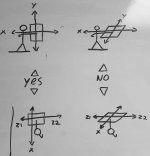
The isometric part aside, what you asked for is exactly what the Z attributes do. See my example image I attached in previous posts. The lower depiction is top down. You can expand an attack or body box "up" or "down" as you put it (side to side from the fighter's point of view) much as you like. That's the Z1 and Z2 properties. And of course you can make it reach further out from the fighter or even behind them with X, and higher, lower with Y. You can do all of these separately from each other to make a cubical shape covering areas as small or large as you want.
The only thing you can't do is (again see the illustration) give any one side of the box a trapezoidal shape.
DC
The isometric part aside, what you asked for is exactly what the Z attributes do. See my example image I attached in previous posts. The lower depiction is top down. You can expand an attack or body box "up" or "down" as you put it (side to side from the fighter's point of view) much as you like. That's the Z1 and Z2 properties. And of course you can make it reach further out from the fighter or even behind them with X, and higher, lower with Y. You can do all of these separately from each other to make a cubical shape covering areas as small or large as you want.
The only thing you can't do is (again see the illustration) give any one side of the box a trapezoidal shape.
DC

magggas
Active member
Well, if this trap entity has to be like it can attack you, but you can’t attack/break it, then i have a script function exactly for that. The catch is that i’m using a wall for that trap with an onblockWscript. So it might still not be ideal for all your cases.
Gurtag
Member
Damon Caskey said:We're having a communication problem, lol.
The isometric part aside, what you asked for is exactly what the Z attributes do. See my example image I attached in previous posts. The lower depiction is top down. You can expand an attack or body box "up" or "down" as you put it (side to side from the fighter's point of view) much as you like. That's the Z1 and Z2 properties. And of course you can make it reach further out from the fighter or even behind them with X, and higher, lower with Y. You can do all of these separately from each other to make a cubical shape covering areas as small or large as you want.
The only thing you can't do is (again see the illustration) give any one side of the box a trapezoidal shape.
DC
how should i declare Z1 and Z2? i use an old openbor build and the legacy manual doesnt said anything about Z1 or 2 just Z alone as the last parameter of an attack box, also as i told O Ilusionista sorry if i am dificult to understand but i apreciate a lot the effort you all put in to it
, anyway i solved it with the work around you mentioned but to be sure i understand you i maded a draw too from back/front perspective 
did i get it right?

magggas said:Well, if this trap entity has to be like it can attack you, but you can’t attack/break it, then i have a script function exactly for that. The catch is that i’m using a wall for that trap with an onblockWscript. So it might still not be ideal for all your cases.
hey magggas, thanks a lot for the help but have not used any script so far i am dull about it lol, i got the pit obstacle to work as desired anyway, just trying to make sure i understand the Z mechanic right in case i need to use it again in the future.
Z1 and Z2 are very old and have been around quite some time. The problem I can see is you just have a fundamental misunderstanding of how it works. Because it does NOT work like your illustration. Z1 and Z2 adjust lateral size of the box and they are in the manual. It's just that simple. Give it a try and you'll see.
DC
DC