Help starting out

MHXGMEX

New member
Hey, guys, hope you're doing well.
I'm the guy doing the Maverick Hunter X: Giga Mission EX project. Initially I wanted to build my own beat 'em up engine, but because of matters with Corona and employment, I found time is one thing I'm short on.

https://twitter.com/gigamissionx/status/1288158091134013443

A pretty barebones video, but something I managed to put together in my free time from assignments in a couple of days.

I figured I could look into porting most of the progress on OpenBOR since it'd help in development with some fundamentals, but as expected I'm running in a few snags. I'm having difficulty getting enemies to palette swap - I tried to apply the same palette via Photoshop batches, but apparently I'm doing something wrong. I tried both remap and alternatepal and I'm not having much luck with it.

4D0oESB.png
ptgk7Wj.png
y5FES2K.gif

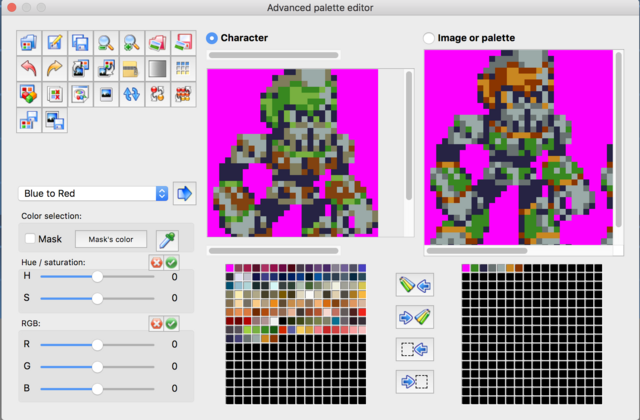
The one on the left is the image used to get the palette, the one on the middle has the purple gem swapped out for green, and the one on the right is an example of a sprite that goes pitch black after using the one on the left to spread the palette. It's weird that even so the one on the middle doesn't manage to remap the enemy. I did try changing the color depth to 32 bit as well.

I did look into Fighter's Factory (most recent version) but it's crashing on me every time I try to start a new character, so I don't know if I'm doing something wrong or stumbled on a legit bug.

Besides that, what are some programs suggested for more indepth editing? I saw the tool Piccolo created, but I don't know whether BoRStats is more stable/recommended over it. And is there any way to skip the title screen straight into character select or the engine for debugging?

I imagine these questions have been answered time and again but I'm just having a tough time balancing my free time besides reading the manuals and trying to filter through trial and error what I'm doing wrong to manage to read the documentation and threads as they would warrant.

Thanks very much in advance.
 
Welcome MHXGMEX!

I just stopped in before talking a work project due tomorrow, but first thing I can tell you is get pal apply by Plombo. It is hands down the best tool for applying a single palette to groups of files - faster than Photoshop CC and produces smaller .png files to boot.

The rest I'll try to answer in time, though I'm betting others here will beat me to it. Working with OpenBOR can be tedious (what engine isn't), but it can replicate any gameplay mechanic you can dream up.

DC
 
MHXGMEX welcome aboard! I saw your project at twitter today.

There are several ways to apply a palette. I've made a tutorial about it for Mugen, but its pretty much the same thing
https://www.chronocrash.com/forum/index.php?topic=60.0

I did look into Fighter's Factory (most recent version) but it's crashing on me every time I try to start a new character, so I don't know if I'm doing something wrong or stumbled on a legit bug.
There are other versions you can try http://fighterfactory.virtualltek.com/
but its strange to see it crashing that way

There is palapply too.

I tried both remap and alternatepal and I'm not having much luck with it.
I would suggest you to use alternatepal - remap is a very oldmethod and its still on the engine only for backward compatibility.

The one on the left is the image used to get the palette, the one on the middle has the purple gem swapped out for green, and the one on the right is an example of a sprite that goes pitch black after using the one on the left to spread the palette. It's weird that even so the one on the middle doesn't manage to remap the enemy. I did try changing the color depth to 32 bit as well.
Can you give me the original images? By the way, all games now run in 32bit mode (the video mode, not the image color depth).

Besides that, what are some programs suggested for more indepth editing?
I use OpenBORStats. You can download it here in downloads section.

And is there any way to skip the title screen straight into character select or the engine for debugging?
Right of the bat, no. But there are shortcuts you can do, like those I've explained here https://www.chronocrash.com/forum/index.php?topic=5015.0


O Ilusionista said:
And is there any way to skip the title screen straight into character select or the engine for debugging?
Right of the bat, no.

O Ilusionista: For skipping title screen to character select screen, yes there is! You can use skiptoset in levels.txt. If you put skiptoset 0, it will skip to the character select screen while being directed to the first mode (set) in the game. However, if you skip character select using skiptoset while skipselect is in place with no character names, it will likely crash unless you make it workable with script.

Example:

Code:
skiptoset 0

loadingbg	1 -1113 -1194 100 -1138 -1220 #loadingbg {set} {bx} {by} bsize} {tx} {ty} {tf}
p1smenu 30 230 30 235 #p#smenu {x1} {y1} {x2} {y2} #x1 and y1 -> Player Position / x2 and y2 -> "Ready!" Position
p2smenu 290 230 290 235
p1life 32 -23
e1life 53 -53
p2life 172 -23
e2life 200 -84
p1icon -56 21
e1icon 262 21 #Will place it for player 1's enemy icon later
p2icon 262 21
e2icon -56 21 #Will change it for player 2's enemy icon later also
timeloc 149 3 22 21 1 #{x} {y} {w} {h} {noborder}
e1name 272 -55
e2name 33 -55
p1lifen 30 -90
p2lifen 210 -90
p1lifex 20 -90
p2lifex 200 -90
p1score 33 55 45 -26 68 43 1 #p{#}score {namex} {namey} {dashx} {dashy} {scorex} {scorey} {font}
p2score -277 -55 45 -26 254 -43 0
lbarsize 114 7 1 1 0 -9999 -9999 -9999 -9999 #{width} {height} {noborder} {type} {orientation} {border} {shadow} {graph} {backfill}
colourselect 1
p1namej 33 55 68 43 68 43 1
p2namej 233 55 233 33 233 33 0


set	Testing_Fight_Level # 0
lives 1
credits 30
continuescore 2 #Determines how taking continue effect score. 1 = score reset to 0 when continue; 2 = 1 point added to your score when continue. like capcom scoring system for putting continue numbers in scores
disablehof 1
disablegameover 1
#single 1
#skipselect Ryu Ken
skipselect
select	data/levels/vs/selectvs.txt
z	230 230 230
file	data/levels/emptyspace.txt
z	200 200 200
file	data/levels/eagle.txt

set	Training_Mode # 1
lives 1
single 1

z	230 230 230
file 	data/levels/garden.txt
 
Hey, thanks for the welcomes, everyone.
O Ilusionista said:
Can you give me the original images? By the way, all games now run in 32bit mode (the video mode, not the image color depth).
https://www.dropbox.com/s/9996p8yypphhtyg/Bone.rar?dl=0

I tried using PalApply and trying to generate ACT files via Photoshop, but the colors still don't swap in-engine.

Using it as:
Code:
palette       data/chars/shermie/palette.ACT

alternatepal  data/chars/shermie/map2.ACT
(Since I'm keeping it on the shermie folder just for now)

Not sure if I should use a different code in the level files themselves instead of "map" - it seems it's still the one used? Also don't know whether I need to set an overarching palette file for the game as a whole.
 
MHXGMEX While I don't use .act for my characters (I do prefer to use the images themselves, so I can preview it quicker), it should work. Unless you are using an old build.

Make a test, and point to image files instead.


And pay attention that you are using the same palette for the alternatepals
palette      data/chars/shermie/palette.ACT

alternatepal  data/chars/shermie/map2.ACT

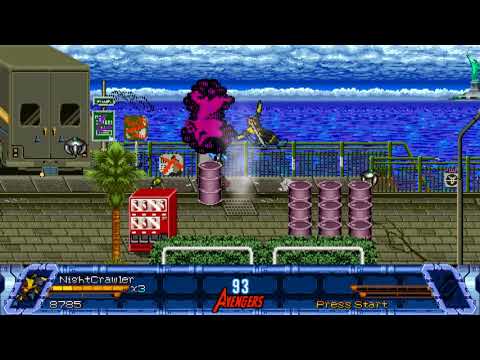
This is how I use in one of my characters
palette      data/chars/hawkeye/0SMARTPAL_BASE-NEW_CLASSIC.gif
alternatepal  data/chars/hawkeye/0SMARTPAL-DARKAVENGERS.gif
alternatepal  data/chars/hawkeye/0SMARTPAL_BASE-PAL3-V2.gif
alternatepal  data/chars/hawkeye/0SMARTPAL_BASE-PAL4-REMIX.gif
alternatepal  data/chars/hawkeye/0SMARTPAL_recolor3.gif
alternatepal  data/chars/hawkeye/0SMARTPAL_Barney_Barton2.gif
alternatepal  data/chars/hawkeye/freeze.gif
alternatepal  data/chars/hawkeye/venon.gif
fmap 6
hmap 7 7

Edit: I saw why it doens't work  - the color table isn't the same between two pictures.
The one at the left is MAP1.png while the ohter is MAP2.png
Notice how the colors uses different indexes (spot positions on the table)
Screen-Shot-2020-07-29-at-7-04-25-PM.png
 
O Ilusionista said:
MHXGMEX While I don't use .act for my characters (I do prefer to use the images themselves, so I can preview it quicker), it should work. Unless you are using an old build.

Make a test, and point to image files instead.
I did it just now, still doesn't cycle the palettes for some reason.
Code:
palette       data/chars/shermie/idle_1.png

alternatepal  data/chars/shermie/idle_1c.png

At the very least, the idle stances should have identical placement according to Photoshop (I'd use FF, but it just crashes):
ubwFqPw.png

It should manage to swap the colors, since just the gold trim has been changed. All the more puzzling, if I insert the ACT file as the main palette, they will spawn as having the green trim and not the gold one.

And pay attention that you are using the same palette for the alternatepals
palette      data/chars/shermie/palette.ACT

alternatepal  data/chars/shermie/map2.ACT
Yeah, that one I did on purpose. I had two different palettes playing with the color tables and I didn't know which one would the map function pick, so I just pointed to the same one who would be properly tabled (same reason why the code above uses them the same way).

On the levels table this is the code used:
Code:
spawn	Shermie
alias	Osso
map	1
health	30
coords	350 220
at	15

Map1.png and Map2.png I never considered that were working as they were left out of the code, they were just left in because I sent the folder in full. The code just referred to the ACT files.

The build I'm using has the following data:
Modified in July 25th, 2020, ver 3.0.0.0 and Chrono Crash is listed in the info strip as well, so I think it's up to date.
 
I managed to fix the issue - I was using drawmethod scalex scaley to make the characters double the size since I was just making a very early asset test to see how they'd behave in the play area. The palettes worked, it was the coding getting in the way of the remaps being properly applied.

ZQ7MlMf.png


That brings me to my next doubts - the sprites are very small since they are Game Boy Color assets and the resolution I'm using in the other engine accounts for that (240x160). Should I change OpenBOR to match this resolution? I heard that different resolutions might not work on Android and Macintosh, and I'd like the compatibility to be as wide as possible. It feels like in 320x240 there is just far too much real estate as is, but I guess it can be remedied by level/enemy design.

Speaking of, I'm modding the very first BoR since it seemed like the best place to start with. Are the walls fixed or can I set them wherever? Going from the beginner's manual I'm not sure. I also would like to have a lot of platforming in this (I'd like to implement wall climbing, but that's a bridge to cross when we get there since I'm well aware I need to familiarize myself with the basics), so are there any specific guides or base mods I should look to learn from?

And are there any recommended level editors as well?

Thanks again in advance.
 
The build I'm using has the following data:
To get your build version, you need to go to LOGS\OpenBorLog.txt and look at this line (6th):
Code:
OpenBoR v3.0 Build , Compile Date: Jul 15 2018

This will get you the compile date and, sadly, you have to see Github page to see which build were released on that date - mine is 6315.
On thje past, we had the compile build on that log - I hope we got it back someday.

I heard that different resolutions might not work on Android and Macintosh
I never heard this, to be honest. I've playing OpenBOR on my android device with different video sizes and I never had any issues.
Macintosh doesn't have an official port anymore - but I run it using WINE and I had no issues with OpenBOR itself.

I don't remember if you can set the video to be that small (240x160). Personally, I would either double the sprite sizes or double the video size under options (but not everyone will make this).

Are the walls fixed or can I set them wherever?
There are different ways to set walls but yeah, they can be set wherever you want to - just remember that walls can't float, so they will be always on ground.

Walls can be a little tricky to start with (and they can bit your ass if you don't set them right), but they are very powerful:
- Using script, you can modify walls too on-the-fly, so you can change walls position and/or disable them
- Walls have TYPES. So you can make a wall to block the path and choose if a wall can be just a path block or a real wall, where you can bounce from.

Take a look at this video, where I was showing this in action
https://www.youtube.com/watch?v=Gx8-4l9_uoM

There is a wall over the truck (a "real wall" as I called above) and a wall over the fences, but I can't bounce from it because its meant to be just a "path block"
0.jpg


You can use platforms to make walls, you can use obstacles to make walls (they will use a platform for that), you can use walls as platforms, etc.

also would like to have a lot of platforming in this (I'd like to implement wall climbing, but that's a bridge to cross when we get there since I'm well aware I need to familiarize myself with the basics),
Yeah, I think you should get around with the basics first, Wall climbing is doable for sure.

And are there any recommended level editors as well?
That is a good question. We have 3 editors, and each one has the PROs and CONS to that use.
  • OpenBORstats - you can build and preview the stage easily. It will show walls and holes (but not Basemaps, since they were added later), but you have to change the values in text mode - there is no drag an drop
  • OBEditor - a very old tool which has a very good stage editor and its my favorite to set platforms, has drap and drop and you can create almost everything visually. Since its old, if you use scripts inside the stage, it can corrupt the files sometimes so I suggest you to always keep a backup.
  • Modders tool - its the only who displays Basemap, you can drag and drop walls and holes (you have to create then in text mode first). But its a bit unstable sometimes.
 
Hey, back at it again, trying to familiarize myself while doing something basic. Did a lot of progress in something, but doing something else than the Megaman project to get off the ground to begin with. So this is maybe a simple question, or not so much, but is there any way to customize the title screen? Such as changing the position of where "Press Start" displays and adding an animation to it.

Thanks in advance once more!
 
MHXGMEX said:

MHXGMEX

The title screen and menu positions are mostly hard coded. Adding animations and custom menus, etc., is doable, but it requires some fairly advanced scripting techniques. Since you're still learning, that's probably beyond your level right now. I would recommend mastering some of the other fundamentals first.

DC
 
Damon Caskey said:
MHXGMEX said:

MHXGMEX

The title screen and menu positions are mostly hard coded. Adding animations and custom menus, etc., is doable, but it requires some fairly advanced scripting techniques. Since you're still learning, that's probably beyond your level right now. I would recommend mastering some of the other fundamentals first.

DC
I agree with that wholeheartedily. Just wondering, though, is there any place that can serve as a good beginner's introduction for scripts? Some stuff like particles I assume would already require those, mostly since mathematics are done to animate separate sprites on their own. It'd be good to just keep stored when it's more time for that.

Also, I did dabble in game development for more than a while now, so while I'm not looking to delve into complex scripts firsthand, is just changing the height of where "Press Start" is displayed that cryptic? I'm fairly sure it can be, but since it'd just be toying with the Y height if that much, it does sound at least stomachable.

Thanks.
 
MHXGMEX said:
I agree with that wholeheartedily. Just wondering, though, is there any place that can serve as a good beginner's introduction for scripts? Some stuff like particles I assume would already require those, mostly since mathematics are done to animate separate sprites on their own. It'd be good to just keep stored when it's more time for that.

You seem to have some mistaken ideas about what is difficult vs. easy in OpenBOR. Particle effects might seem complex, but they're really child's play. The particle effect is just another model. You spawn it as an entity when needed and that's about it. Entities are rich enough in functionality to handle pretty much any particle effect you want. If it's something like Ken's flaming fist you bind it to the parent entity. Script handles the binding, but there's nothing tricky or overly technical to worry about. You can add in some randomizing and such, but even that isn't hard to do.

Moving the start menu... just the opposite. Sounds simple. It isn't. More on that below.

Also, I did dabble in game development for more than a while now,

Don't misunderstand, I'm not saying you lack technical ability overall. But yes, when it comes to OpenBOR, I can tell by your statements you are very much a beginner. There's no insult in that. I'll use myself as an example. I'm working on an eventual PhD in Technology Management. By byte volume I've contributed more code to the engine than the other top 5 developers combined, and that's with about a third of my work log lost to a user name change. By extension I'm  the overall most knowledge person when it comes to module building. But, if I went over to the Mugen community? I'd be lost. Sure, my background would give me an advantage, but I still wouldn't know the specifics of the application until I got hands on for a while.

so while I'm not looking to delve into complex scripts firsthand, is just changing the height of where "Press Start" is displayed that cryptic? I'm fairly sure it can be, but since it'd just be toying with the Y height if that much, it does sound at least stomachable.

See my previous statement - all aspects of the native menu are hard coded. Other than swapping fonts, there is nothing you can do at all to change any of it directly, not even with script. Does that mean you can't have a "Press Start" where you like it? Absolutely not. But to do it, you will have to build your start up menu entirely from scratch with script and display it over the native menu. You'll need to understand how to capture keys events and when/how to allow those events on through to the engine.

It's doable yes, but could be far and away more complex and time consuming than building the rest of your module combined. If you still want to try, I suggest you check out SORX by Kratus. Even he doesn't bother supplanting the main menu, but he has a ton of custom submenus can act as a template for you.

DC
 
Damon Caskey said:
Don't misunderstand, I'm not saying you lack technical ability overall. But yes, when it comes to OpenBOR, I can tell by your statements you are very much a beginner.
I wouldn't call myself a beginner - I'd call myself a novice at being a beginner, and I'll hopefully upgrade to 'just' beginner in a few months, haha. But yeah, the way you worded the deal with the Start menu clarified how it fits for me - I thought the "hard coded" bit wasn't as serious as needing to be overriden by a new script as opposed to just having values changed here and there, which'd mean even a total script newbie could maybe handle it. That  definitely puts things in perspective. Appreciate the explanation.

I figured since now I have actual captures of what I'm doing to try to get accustomed to the engine:
https://www.youtube.com/watch?v=XaeJeq5bYJw
(everything quite work in progress, as to be expected)

I just noticed keeping the enemies with flying kicks as just using the "jumpattack" animation seems to have them sort of docile about using it, since in the game they come from they're more hostile with those. Guessing those are only changeable with scripts?
 
Hello MHXGMEX! As DC suggested, I have some custom menu codes in SOR2X if you need. In my case, I changed the title screen with a small script that plays a webm scene, but you can use a gif, call an entity or draw a sprite by script. Although you can't change the "press start" directly by script, there's other ways to do it.

EDIT:
I had another idea. If you have the file "translation.txt" in your data folder, you can replace the "press start" words by a simple space
It will erase all text, and then you can make an title screen image that contains another "press start" made by you, or use the drawstring function to write your own.
 
Kratus said:
EDIT:
I had another idea. If you have the file "translation.txt" in your data folder, you can replace the "press start" words by a simple space
It will erase all text, and then you can make an title screen image that contains another "press start" made by you, or use the drawstring function to write your own.
Worked like a charm, man, thank you very much. I saw from other threads someone did manage to make their own menu with coding, so I'll save that one for referrence when I get to that point.

O Ilusionista said:
Following the translation.tx Kratus mentioned above, you can even have cursors on the menu using a simple font trick: http://www.chronocrash.com/forum/index.php?topic=5120.0
Thanks, will keep this in mind as well!
 
Damon Caskey said:
Nice Kratus. It may not move the text, but "spacing" it out is a very nice workaround!
Thanks Damon Caskey

Man, please I need to ask one question, not related to "title screen" but is related to "select screen".

Is there a variable that is accessible by script and allows me to change the current highlighted player (or model)? After a lot of tests, I discovered that I can change the highlighted character by using changeplayerproperty(0, "name") but it will take effect only when the select screen disappears and the next level starts.

My intention is to change players during select screen by pressing "moveup/movedown" keys too. I tested other ways, like to create a level that simulates a "fake" select screen and worked (like The Bruiser Brigade), but if I found a way to change any highlighted model during select screen, I think it can be better.

The game Final Fight LNS has an effective select screen using all directions. However, after opening the game, I discovered that the source code was changed, which makes me think it's very hardcoded. I don't want to go this way, if there's no accessible variable that can be changed, I will work on the "fake" select screen using a level.
 
Back
Top Bottom