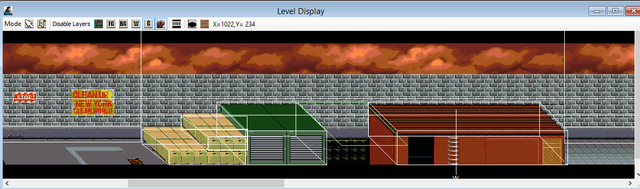
oldyz: I bet you were trying to look for the image I made long ago.
It's also in the manual. Search the name called wall and you will see that image.
Gabo Hanzo: You cannot use platform as a wall in a level like that. You should use wall. Walls and platforms work the same with 8 parameters. For using wall in the level, note that you cannot use it to float anywhere in the level. But using platform as a platform entity, you CAN use it for making it float anywhere you want.
If you are new to using walls or platforms, start with wall with all 0's (zeros). You can adjust it later if you get used to/a little good at it. Around in the level when you have wall in place with all 0s, it's located at the top left of the very beginning of the level (in pixels). OpenBOR reads images/pixels too.
Code:
wall 0 0 0 0 0 0 0 0 #wall {xpos} {zpos} {upperleft} {lowerleft} {upperright} {lowerright} {depth} {alt} {type}
You can label too in case you won't forget. The ninth one is optional which I don't use much.
EDIT: For instance, if your z is 160 220, you can place a wall at 170 in y and with the width/depth as 10 or 15 to increase the walkable size. Even 8 for height. You can increase the right side corners as 100 pixels.
Example:
Code:
wall 0 170 0 0 100 100 15 8