Solved Is this a bug? Identical bglayers not parallel

Question that is answered or resolved.

ipkevin

Member
Is this a bug with openbor?

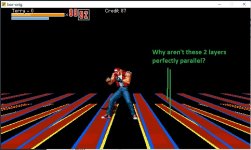
I have 2 bglayers using identical sized artwork and identical bglayer properties EXCEPT for zposition. Mode7 watermode is activated. I expected to see 2 layers 'stacked' on top of each but otherwise moving in perfect sync with the lines parallel to each other. But as you can see from the screenshot, the lines do not look not parallel. It almost looks like the 'top' layer is wider closer to the viewer compared to the lower layer.

Why is this happening? Shouldn't the lines be parallel if the art is identical in size (i only changed the colors) and all of the bglayer properties are the same besides zposition? Is this a bug?

Here's a screenshot:
mode7 bglayers not parallel.jpg

And here's the code for the layers:
Code:
bglayer    data/bgs/street/layer1.png 0 0 0 185 0 0 -1 1 1 0 3 0.5 2 1 0
bglayer    data/bgs/street/layer2.png 0 0 0 165 0 0 -1 1 1 0 3 0.5 2 1 0
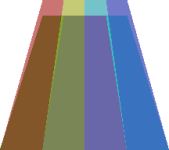
 
The lines aren't parallel because the math dictates they can't be. OpenBOR assumes the layer extends from wherever it starts all the way to bottom of screen, and a bit beyond depending on image size. Notice the top lines are parallel, and if you could see the very bottom, they would be too. The starting width and ending width (Horizontal size) are controlled by your settings. That leaves the length, which is not the same because the layers are starting at different positions. Therefore the scaling for them to reach identical widths at the bottom will produce a different visual angle, making them appear to be out of sync.

You can see this same effect in Photoshop:

affine_demo_0.png

In game engines, the discrepancy is amplified by scrolling math, which adds a lot of moving parts to the equation. That's why polyonal engines use triangles instead of quadrilaterals - it's a royal PITA to transform quadrillaterals in any way and make them line up right. If you want to lay two identical affine layers over each other, I would suggest trying out screens. The engine can create invisible inset windows of any size and manually insert graphics into them or copy portions that already exist. Look up the zoom effect in modules like Avengers and you can see it's fairly simple. You can use the exact same technique to replicate a layer with its position slightly offset.

DC
 
Thank you, DC! That diagram is very helpful to understanding what's going on. I guess there currently isn't a way to change the zposition of the bottom edge?

And thank you for the tip on where to look for screens info. I remember hearing about screens before, but it doesn't seem to be covered in the openBOR manual yet. I actually want to stack multiple layers with the same dimensions but different artwork to create a 3D object effect (like 3D cubes that change to match your viewpoint via the mode7/affine transformation).
 
Last edited:
I guess there currently isn't a way to change the zposition of the bottom edge?

No. It's determined by the image's vertical size. You can make layers that don't extend to the bottom without screens just by using shorter images. Also, it's always a good idea to make sure your image sizes are a multiple of 4. That's what the formulas are designed around. Doesn't solve your particular case, but just an FYI.

DC
 
Oh interesting, using shorter images on the top layers really does what I need. Just need to wrap my head around balancing the image's vertical size and the adjustments to zposition to make the layers look right in relation to each other. But it's definitely looking better already. Thank you again, very helpful!

---

Last question and I will stop bothering you:

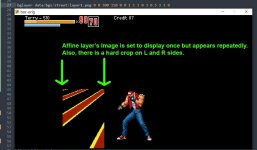
I have an affine layer with a single rectangle image that is set to display only once (ie, xrepeat=1). I want it to scroll by with proper mode7 effect as I walk by, but 2 problems occur:
  1. It repeats multiple times within its 'box' rather than just once (see image below)
  2. It gets cropped on the sizes as it scrolls/transforms as if it's contained in a box (again, see image). So as you walk by the rectangle, it starts to transform but gets cut off at the edges.
Is that all by design or am I missing some setting? I can mitigate #2 by widening the image with a lot of transparency color to the left & right of the artwork. But #1 still occurs no matter what. Is this unavoidable?

affine_crop&repeat.jpg
 
Last edited:
I have an affine layer with a single rectangle image that is set to display only once (ie, xrepeat=1). I want it to scroll by with proper mode7 effect as I walk by, but 2 problems occur:
  1. It repeats multiple times within its 'box' rather than just once (see image below)
  2. It gets cropped on the sizes as it scrolls/transforms as if it's contained in a box (again, see image). So as you walk by the rectangle, it starts to transform but gets cut off at the edges.
Is that all by design or am I missing some setting? I can mitigate #2 by widening the image with a lot of transparency color to the left & right of the artwork. But #1 still occurs no matter what. Is this unavoidable?

Answering my own question for posterity: These all seem to be by design, but you can eliminate a lot of the effect by setting your beginsize higher (like >0.9) and adding more transparent width to the image so that the artwork can fully skew left to right within the bounds of the image dimensions.
 
Last edited:
Back
Top Bottom