My solution for No more loading bars nor loading text

This is my solution for making that pesky "loading..." text go away for a game. I'm fine with a few seconds of black in between levels rather than this flash of "loading...".

You can trick the engine into drawing a literal "invisible" object.
  1. Keep your coordinate lines but change the final font index parameter to 0:

    Code:
    loadingbg        1 -1000 -1000 0 -1000 -1000 0
    loadingbg2       1 -1000 -1000 0 -1000 -1000 0


  2. In the OpenBOR engine, Color Index 0 is strictly reserved as the alpha transparency mask (color-keying).
  3. By setting the font type and bar parameters to 0, the engine translates the artifact's pixel color data as transparent, making the artifact completely invisible to the screen buffer.
Sharing this for anyone else like me wants to nix the loading text.
 
This is my solution for making that pesky "loading..." text go away for a game. I'm fine with a few seconds of black in between levels rather than this flash of "loading...".

You can trick the engine into drawing a literal "invisible" object.
  1. Keep your coordinate lines but change the final font index parameter to 0:

    Code:
    loadingbg        1 -1000 -1000 0 -1000 -1000 0
    loadingbg2       1 -1000 -1000 0 -1000 -1000 0


  2. In the OpenBOR engine, Color Index 0 is strictly reserved as the alpha transparency mask (color-keying).
  3. By setting the font type and bar parameters to 0, the engine translates the artifact's pixel color data as transparent, making the artifact completely invisible to the screen buffer.
Sharing this for anyone else like me wants to nix the loading text.

I wouldn’t say “tricked” so much as doing exactly what it’s meant to do, but yes - this is a nice technique.

One word of caution though: loading speeds are relative, and they won’t always be as fast for everyone else as they are for you. The engine is pretty darn quick most of the time, but on a bogged-down system, slow drive, or cold file cache, someone might see a few seconds of nothing and assume the game crashed.

DC
 
By setting the font type and bar parameters to 0, the engine translates the artifact's pixel color data as transparent, making the artifact completely invisible to the screen buffer.
Code:
loadingbg    set      bx           by           bsize        tx           ty           tf
loadingbg    1        -1000        -1000        0            -1000        -1000        0
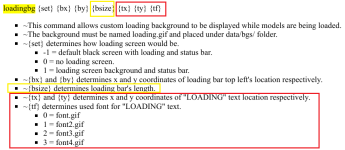
Friend, just checking the information because it may confuse people. The font type 0 is the first one in the sprites folder, it's not related to colors.
Indeed the loading text will not appear in your code, but it's because the x/y coordinates are moving it outside of the visible area depending on your game's resolution.

Plus the bsize parameter is related to the bar's length, not colors. So, having a length of 0, in fact it will not appear because the horizontal increment will be basically disabled.

1783201242547.png


In case you want to manage the loading bar colors, it can be done in the lifebar.txt file.

 
Code:
loadingbg    set      bx           by           bsize        tx           ty           tf
loadingbg    1        -1000        -1000        0            -1000        -1000        0
Friend, just checking the information because it may confuse people. The font type 0 is the first one in the sprites folder, it's not related to colors.
Indeed the loading text will not appear in your code, but it's because the x/y coordinates are moving it outside of the visible area depending on your game's resolution.

Plus the bsize parameter is related to the bar's length, not colors. So, having a length of 0, in fact it will not appear because the horizontal increment will be basically disabled.

View attachment 15261


In case you want to manage the loading bar colors, it can be done in the lifebar.txt file.


I should have look closer in my own answer. Good catch @Kratus!

DC
 
Back
Top Bottom