Hi everyone,
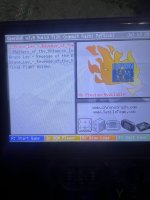
I’m having a frustrating issue with OpenBOR on my R365 handheld system. Initially, I had trouble with the “Bruce Lee: Revenge of the Dragon” game, where the buttons weren’t responding properly. I deleted the game, re-added it, and later added “Masters of the Universe.” After deleting both games, I noticed that they still show up in the OpenBOR BIOS screen despite being removed from the flash drive.
Now, whenever I try to load any OpenBOR game, I get stuck on the OpenBOR splash screen with options like “Start Game,” “BGM Player,” and “View Logs.” I’ve tried the following steps:
1. Deleted all XML files and metadata files on the flash drive.
2. Cleared the OpenBOR folder and reloaded games one by one.
3. Attempted to reset settings on the device (both advanced and retroarch-related).
None of these actions have resolved the issue. It seems like remnants of the deleted games are stuck somewhere in the system, but I can’t locate any files referencing them, either on the flash drive or in the OpenBOR folder.
If anyone knows how to completely clear the metadata or reset OpenBOR settings to default without wiping the entire R365, or an easier way to fix this I’d greatly appreciate your help. I’m hesitant to reformat the device since I don’t want to risk losing other working configurations.
Thanks in advance for any advice or guidance!
I’m having a frustrating issue with OpenBOR on my R365 handheld system. Initially, I had trouble with the “Bruce Lee: Revenge of the Dragon” game, where the buttons weren’t responding properly. I deleted the game, re-added it, and later added “Masters of the Universe.” After deleting both games, I noticed that they still show up in the OpenBOR BIOS screen despite being removed from the flash drive.
Now, whenever I try to load any OpenBOR game, I get stuck on the OpenBOR splash screen with options like “Start Game,” “BGM Player,” and “View Logs.” I’ve tried the following steps:
1. Deleted all XML files and metadata files on the flash drive.
2. Cleared the OpenBOR folder and reloaded games one by one.
3. Attempted to reset settings on the device (both advanced and retroarch-related).
None of these actions have resolved the issue. It seems like remnants of the deleted games are stuck somewhere in the system, but I can’t locate any files referencing them, either on the flash drive or in the OpenBOR folder.
If anyone knows how to completely clear the metadata or reset OpenBOR settings to default without wiping the entire R365, or an easier way to fix this I’d greatly appreciate your help. I’m hesitant to reformat the device since I don’t want to risk losing other working configurations.
Thanks in advance for any advice or guidance!