Openbor WASM build github with super doginals game

pimax

Member
Hi guys,

Just want to share my work on an openbor WASM build I made available in this github: OpenBOR-WASM

It also comes with my own game "Super Doginals", a doge themed game.

In addition to the port, I did just few fixes and minor improvements:
+ webm vp9 support with async play instead of threading for web.
+ ogg support for all sounds so you don't necessarily need to keep some wav in your game
+ fixed stereo tracks playback (stereo tracks had issues)
+ fixed stage direction "up" (up and down both considered as down in current code)
+ added back legacy "holes"

Full change log here

It would be great if Openbor dev would support a wasm build officially. I can do a commit in OpenBOR github if they agree.

There is a lot of mention to "doginals" in my repo, which are specific to deploying the game to dogecoin, but you can ignore it if you just want to create a standard wasm game.

Here is the game links, it's free and originally was just meant to be a port of BOR for WASM but I went all-in and just made my own full game instead (its my first):


itch.io

dogecoin link (yes the game also lives on dogecoin blockchain)

enjoy!
 
Hi guys,

Just want to share my work on an openbor WASM build I made available in this github: OpenBOR-WASM

It also comes with my own game "Super Doginals", a doge themed game.

In addition to the port, I did just few fixes and minor improvements:
+ webm vp9 support with async play instead of threading for web.
+ ogg support for all sounds so you don't necessarily need to keep some wav in your game
+ fixed stereo tracks playback (stereo tracks had issues)
+ fixed stage direction "up" (up and down both considered as down in current code)
+ added back legacy "holes"

Full change log here

It would be great if Openbor dev would support a wasm build officially. I can do a commit in OpenBOR github if they agree.

There is a lot of mention to "doginals" in my repo, which are specific to deploying the game to dogecoin, but you can ignore it if you just want to create a standard wasm game.

Here is the game links, it's free and originally was just meant to be a port of BOR for WASM but I went all-in and just made my own full game instead (its my first):


itch.io

dogecoin link (yes the game also lives on dogecoin blockchain)

enjoy!

Like I said when you first brought this up - I'm passionate about not adding ports, but I have to admit this has some merit - but I'm not interested in a flash in the pan kind of thing. If you're just going to make a port and then vanish, then I don't want anything to do with it.

I like some of the fixes you made too. Right now I'm up to my nose in finals and a Drupal migration project at work, but I'll tag in other devs/interested parties to take a look.

@Kratus,
@SX,
@Plombo,
@msmalik681
@O Ilusionista

DC
 
I like the fixes you made too. Right now I'm up to my nose in finals and a Drupal migration project at work, but I'll tag in other devs/interested parties to take a look.
I am on the same boat of you about ports. But I confess that this could be at least worth a try.
There is just one thing I didn't liked: the legacy hole added back. I remember we had a discussion about it before and I see no point on bringing it back legacy "hole" not supported anymore
 
I am on the same boat of you about ports. But I confess that this could be at least worth a try.
There is just one thing I didn't liked: the legacy hole added back. I remember we had a discussion about it before and I see no point on bringing it back legacy "hole" not supported anymore

Yeah, some things would have to go. No back-porting legacy stuff. Absolutely NO. Like I also said before - did that for 20 years and I'm done. I don't care why and I don't want to hear about it.

Other than that, I'm willing to talk.

DC
 
Hey man this is big deal, people will be able to play in the browser .
If it works and its based on a stable build, its defo a big deal.
If i were in charge, id adapt it and make games playable on chronocrash site.
Great job.
 
Hi guys,

Just want to share my work on an openbor WASM build I made available in this github: OpenBOR-WASM

It also comes with my own game "Super Doginals", a doge themed game.

In addition to the port, I did just few fixes and minor improvements:
+ webm vp9 support with async play instead of threading for web.
+ ogg support for all sounds so you don't necessarily need to keep some wav in your game
+ fixed stereo tracks playback (stereo tracks had issues)
+ fixed stage direction "up" (up and down both considered as down in current code)
+ added back legacy "holes"

Full change log here

It would be great if Openbor dev would support a wasm build officially. I can do a commit in OpenBOR github if they agree.

There is a lot of mention to "doginals" in my repo, which are specific to deploying the game to dogecoin, but you can ignore it if you just want to create a standard wasm game.

Here is the game links, it's free and originally was just meant to be a port of BOR for WASM but I went all-in and just made my own full game instead (its my first):


itch.io

dogecoin link (yes the game also lives on dogecoin blockchain)

enjoy!
@pimax Amazing job! I'm familiar with cryptocurrency and saw a lot of references in the game: Shiba, Doge, Pepe, Mew, Ape and laughed a lot with the "Wenlambo" enemy 🤣🤣🤣
Maybe some thing like "Crypto Fighters" could be a good idea for a beat em up, since memecoins gives a huge amount of ideas for that.

About the engine, I would suggest making this port based at least on the build 7612, which is very stable plus hugely tested by all SORX players.
If you are interested to port it to the build 7612, I can give a hand to test by trying a possible SORX-WASM version.

I saw you changed the engine to read zip files, I'm very interested to test this feature in the official version.

There is just one thing I didn't liked: the legacy hole added back. I remember we had a discussion about it before and I see no point on bringing it back legacy "hole" not supported anymore
+1 to it.
 
I am on the same boat of you about ports. But I confess that this could be at least worth a try.
There is just one thing I didn't liked: the legacy hole added back. I remember we had a discussion about it before and I see no point on bringing it back legacy "hole" not supported anymore
yes the legacy holes, is definitely not necessary, you can totally omit it. I kept it in my build because of my original idea to just port the BOR game but changed my target to make my own game anyway and tried to follow more modern usage of openbor while creating it (tried my best to catch up with all the wonderfull things you created with openbor). So this legacy hole thing is definitly not important in the end.

the good thing about a wasm build:
+ it works for windows/mac/android/ipad/iphone etc... and browsers do detect most gamepads natively today.
+ with a single web link, people could play your game instantaneously, without install. This increases greatly openbor visibility and gives it more reach as everybody uses web browsers on their day to day devices.

Diving a bit more into the technicals for this port to give you a better idea of what is different and needs to be considered:
I would say that the wasm build in itself only involves switching few functions to an async mode. Its defintily not a heavy transformation, but an overwrite of few functions (like sdl_delay or equivalent sleep functions in the c code). The game logic and code structure remains the same.

While it is not too hard, its also not too easy either to consider the details. It does need time to review it carefully. Here are the few considerations that comes to my mind that cover all the main technical areas I encountered:

+ when the game is waiting for next frame or pausing, it need to be switched to equivalent "async" functions, as a web build do not allow blocking processes and need to give back control to the browser (this is what the wasm port was all about compared to original code and I switched all only when you build for WASM).
+ Once you make the wasm build, you still need few extra javascript+html lines of code to load the wasm engine with your game package in the browser (also include mobile support that i did with a javascript overlay). I provide all the code for that in my github and tried to make it super easy to modify it to run your own game with the port.
+ game controllers are detected automatically by browsers and button mapping might be different between web and other platforms (just save a preconfigured cfg like I did with the game provided or let users remap their game pads). in the end there is no code involved.
+ persistent save files are not recommended. if a user delete his web cache, all saves would be gone (this is the only major drawback for a basic web build).

the most difficult part was actually to make the video playback (webm) to work with wasm (switching from a threading webm playback to an async one because web apps are fully compatible out of the box in async mode while threading arent). But I managed to do it and added VP9 codec for webm videos (it compresses videos better than vp8 and is a more modern codec).

@DCurrent I understand your concerns as I am here to provide all the code for the port + fixes that you would like, but I don't want to pretend I can actively maintain it myself in time. I do have lots of things to work on and its hard for me to figure out priorities today, Everything is so much time consuming. Although making this game was definitly a personal challenge and a childhoud dream achievement. I definitly do want to share all the code for this port, so if someone officially maintaining openbor is willing to take a look and adapt it for your needs, just let me know.

Also, if anyone is interested to improve the game itself, you are very welcome to do so. Just let me know.
 
Last edited:
@pimax

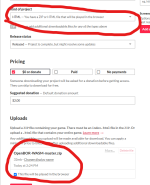
Is your game directly uploaded onto itch.io?

I downloaded your build and directly uploaded into a private itch.io page to try to run it.

1734158115992.png

Got this result. I don't think you have instructions on how to upload to itch.io

Here is how i set it to test

EDIT: I changed the game.html file into index.html and reuploaded. it now runs BUT it's stuck at Loading... in itch.io

1734158765639.png
 

Attachments

  • 1734158211519.png
    1734158211519.png
    77.2 KB · Views: 2
Last edited:
I also just unzipped your github download and tried to run it locally on chrome browser and opera browser. However it's simply stuck at loading.

I didn't change any files or change the file names in the game.html, im just testing how to run it atm.

Do I need to edit this just to run your default game?

assetsPaths: [contentPath + 'game.zip'], // change this to your game (you can specify multiple .zip files for consecutive overwriting patches)
'OpenBOR.zip': contentPath + 'OpenBOR.zip', // OpenBOR engine WASM port
'game.css': contentPath + 'game.css',
'main.js': contentPath + 'main.js',
'mobile.js': contentPath + 'mobile.js',
'buttons.zip': contentPath + 'buttons.zip',
'fflate.min.js': contentPath + 'fflate.min.js',
'nipplejs.min.js': contentPath + 'nipplejs.min.js',

1734158379585.png
 
Last edited:
I feel having a web port is essential tried to port to wasm and failed miserably. If this dev is happy to maintain the port we should add it. the final decision is down to DC but I really hope we add this as it will make it easier for openbor game makers to share their projects.
 
yup even http://localhost:8000 does not allow to run github html with the game

And i agree with Mohammad, this basically makes openbor run on anyuthing that has web browser.... anything .

---
Ok got it to run locally ----
1.Do not use zip, change it to pak inside html file , so it says game.pak where it says game.zip and keep your game in pak format inside content directory

2. Now go to folder with github files where html is and type cmd in windows where paths is ( it will open commandline)

run in commandline this :
python -m http.server 8000

Then go in web browser to this address: http://localhost:8000/

and just click on html thats on the list, and it plays the game
remember you have to adjust height width for the game inside the html file to match the resolution.


So... thre appears to be problem with zip unpacking. cause pak works fine when ran from server.
 
Last edited:
yup even http://localhost:8000 does not allow to run github html with the game

And i agree with Mohammad, this basically makes openbor run on anyuthing that has web browser.... anything .

---
Ok got it to run locally ----
1.Do not use zip, change it to pak inside html file , so it says game.pak where it says game.zip and keep your game in pak format inside content directory

2. Now go to folder with github files where html is and type cmd in windows where paths is ( it will open commandline)

run in commandline this :
python -m http.server 8000

Then go in web browser to this address: http://localhost:8000/

and just click on html thats on the list, and it plays the game
remember you have to adjust height width for the game inside the html file to match the resolution.


So... thre appears to be problem with zip unpacking. cause pak works fine when ran from server.

Thanks, where do you put your Saves folder in that case?

Also, do you need to unzip the OpenBOR.zip as well?
 
i assume it will be created , you do not need saves folder when you run the game 1st time
you dont unpack openbor zip.
If you do step by step that i posted, it will work fine.
 
I also just unzipped your github download and tried to run it locally on chrome browser and opera browser. However it's simply stuck at loading.

I didn't change any files or change the file names in the game.html, im just testing how to run it atm.

Do I need to edit this just to run your default game?

assetsPaths: [contentPath + 'game.zip'], // change this to your game (you can specify multiple .zip files for consecutive overwriting patches)
'OpenBOR.zip': contentPath + 'OpenBOR.zip', // OpenBOR engine WASM port
'game.css': contentPath + 'game.css',
'main.js': contentPath + 'main.js',
'mobile.js': contentPath + 'mobile.js',
'buttons.zip': contentPath + 'buttons.zip',
'fflate.min.js': contentPath + 'fflate.min.js',
'nipplejs.min.js': contentPath + 'nipplejs.min.js',

View attachment 9851

to deploy on itch.io there are some specifics to itch io that you need to follow :

+ rename game.html to index.html
+ move all the files from content folder in the root directory with index.html

+ change the paths in index.html :

<title>Super Doginals</title> // change this to your actual game mod name
....
const contentPath = ''; // change this to empty string (root directory with index.html)
window.myGame = {
contentPath: contentPath,
paths: {
// standard web app
assetsPaths: [contentPath + 'game.zip'], // change this to your game assets (.pak or .zip)
'OpenBOR.zip': contentPath + 'OpenBOR.zip',
'game.css': contentPath + 'game.css',
'main.js': contentPath + 'main.js',
'mobile.js': contentPath + 'mobile.js',
'buttons.zip': contentPath + 'buttons.zip',
'fflate.min.js': contentPath + 'fflate.min.js',
'nipplejs.min.js': contentPath + 'nipplejs.min.js',

},
assetType: 'zip', // change this to .pak or .zip if your game is a .pak or .zip
baseWidth: 320, // change this your game native resolution
baseHeight: 240, // change this your game native resolution
};

+ zip all the files in a single zip that you will import to itch io.

Please note:
+ the javascript overlay i did for mobile support only includes few buttons (for my game needs). You might need to add images for buttons in the 'buttons.zip', change their positions in game.css and key mapping in mobile.js
+ when using .zip for your game, you can also add the 'saves' folder to include your game cfg file ( preconfigured button mappings for gamepads, video settings, etc..)
 
Last edited:
@pimax Amazing job! I'm familiar with cryptocurrency and saw a lot of references in the game: Shiba, Doge, Pepe, Mew, Ape and laughed a lot with the "Wenlambo" enemy 🤣🤣🤣
Maybe some thing like "Crypto Fighters" could be a good idea for a beat em up, since memecoins gives a huge amount of ideas for that.

About the engine, I would suggest making this port based at least on the build 7612, which is very stable plus hugely tested by all SORX players.
If you are interested to port it to the build 7612, I can give a hand to test by trying a possible SORX-WASM version.

I saw you changed the engine to read zip files, I'm very interested to test this feature in the official version.


+1 to it.
thank you, I believe that the wasm port might actually be based on build 7612 if that build matches the latest code version in DCurrent repo. I may have assumed it was 7533 because its latest number in the repo release section. but this wasm port is based on latest code version as of today.

regarding the .zip its not the engine itself that does it but the javascript code that prepares the game. If you submit a .zip for your game, it will unzip it before starting the engine. if you submit a .pak, its the engine that will load and handle it directly.
 
yup even http://localhost:8000 does not allow to run github html with the game

And i agree with Mohammad, this basically makes openbor run on anyuthing that has web browser.... anything .

---
Ok got it to run locally ----
1.Do not use zip, change it to pak inside html file , so it says game.pak where it says game.zip and keep your game in pak format inside content directory

2. Now go to folder with github files where html is and type cmd in windows where paths is ( it will open commandline)

run in commandline this :
python -m http.server 8000

Then go in web browser to this address: http://localhost:8000/

and just click on html thats on the list, and it plays the game
remember you have to adjust height width for the game inside the html file to match the resolution.


So... thre appears to be problem with zip unpacking. cause pak works fine when ran from server.
yes if you want to run it locally, just downlaod the repo and start a webserver, just like you say. most people I assume have .pak for their game so yes, you also need to change to .pak instead.
.zip is an addition I did because it will allow me to deploy patches or additional content in the future. its mostly relevant for putting the game on dogecoin as it is expensive to redeploy a large file many times and its better to only deploy only what changed instead. but this is only useful for deploying the game on dogecoin and not relevant for standard openbor users who just want to deploy for the web.
E.g of what i mean for dogecoin:
assetsPaths: [contentPath + 'game.zip', contentPath + 'patch.0.1.zip', contentPath + 'patch.0.2.zip', contentPath + 'patch.0.3.zip, contentPath + ...] // this will overwrite and add files in the order provided

but for standard openbor users :
assetsPaths: [contentPath + 'yourmod.pak'] // just put the latest version of your .pak
assetType: 'pak',

then following your own instructions (open cmd in the game.html folder, run the python command to start a web server, open your browser here : http://localhost:8000/game.html)


--
Note regarding zip vs pak for your game:

if you look at my game.zip structure it contains the 'data' folder and 'saves' folder with a .cfg file in it.

adding the 'saves' folder through the .zip helps to deploy your game with preconfigured settings with the cfg file. While using .pak contains only the "data" folder of your game and any preconfigured settings/buttons would not be included, reverting to default settings at each launch.
 
Last edited:
SAve this to bat file next to html file and just click it

Code:
@echo off
echo Starting local server...
start /B python -m http.server 8000
timeout /t 2
start http://localhost:8000/game.html
echo Server started at: http://localhost:8000/
pause
 
to deploy on itch.io there are some specifics to itch io that you need to follow :

+ rename game.html to index.html
+ move all the files from content folder in the root directory with index.html

+ change the paths in index.html :

<title>Super Doginals</title> // change this to your actual game mod name
....
const contentPath = ''; // change this to empty string (root directory with index.html)
window.myGame = {
contentPath: contentPath,
paths: {
// standard web app
assetsPaths: [contentPath + 'game.zip'], // change this to your game assets (.pak or .zip)
'OpenBOR.zip': contentPath + 'OpenBOR.zip',
'game.css': contentPath + 'game.css',
'main.js': contentPath + 'main.js',
'mobile.js': contentPath + 'mobile.js',
'buttons.zip': contentPath + 'buttons.zip',
'fflate.min.js': contentPath + 'fflate.min.js',
'nipplejs.min.js': contentPath + 'nipplejs.min.js',

},
assetType: 'zip', // change this to .pak or .zip if your game is a .pak or .zip
baseWidth: 320, // change this your game native resolution
baseHeight: 240,
};

+ zip all the files in a single zip that you will import to itch io.

Please note:
+ the javascript overlay i did for mobile support only includes few buttons (for my game needs). You might need to add images for buttons in the 'buttons.zip', change their positions in game.css and key mapping in mobile.js
+ when using .zip for your game, you can also add the 'saves' folder to include your game cfg file ( preconfigured button mappings for gamepads, video settings, etc..)

Thanks!

trying it now....its reading it!

but itch.io has a 1000 file limit, even my smallest game has 3000 files lol, trying to cut down just to test it now
 
Thanks!

trying it now....its reading it!

but itch.io has a 1000 file limit, even my smallest game has 3000 files lol, trying to cut down just to test it now
your game in itself should be only a .pak or .zip single file.
lets talk through discord, i will help to guide you
 
Back
Top Bottom