Solved Sprite images work well on openbor but not on neo_edit_pack

Question that is answered or resolved.

SuperJojoDev

New member
I'm experimenting with creating characters. At first I could not understand why my png image never had the right colors even though I'd followed every instruction on the manual so far. Turns out I was using neo_edit_pack as a base, and when I tried using OG openBOR the image colors showed up as intended. There must be some simple color config I'm missing on neo_edit_pack. For now I'll be working on openBOR, but as a newbie I'd love to know what I'm doing wrong since this knowledge will probably be useful later. Thanks in advance.
 
Solution
I think one thing I forgot to mention is that I always use images as palettes. If I open all images in layer mode and index them (GIMP loads depending on how many images you have opened), I right-click the palette box and select "Rearrange Colormap." You drag that color box of the background to the first box or the very top-left corner. Hit enter and you can save one image as a png file for a palette. No need to worry about saving the rest manually. Well, that's me when it comes to saving one image as/for a palette instead of making palette files. I know there are people who do different ways of saving files for palettes and I'm fine with those who do differently, such as using Alferd Spritesheet Unpacker to split from sprite sheets to...
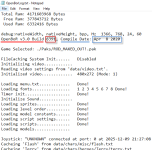
What version or build of OpenBOR are you using? If you don't know what I mean, you go to the Logs folder. Open up OpenBorLog.txt file. You see either the build number (left) or the compile date (right). Or it can be both. It depends on what version of OpenBOR you are using.

12-29-2025 11-55-31 PM.png12-29-2025 11-57-32 PM.png

Do all your frames you use have the same color palette? If not, the images you use in the code should have the same color palette. Check if your images have the same palette. If you have one of the images that is different from the rest inside the code, it results to messy colors. Double-check if any of your image has the same or different colors for your character. There must be some color error in one or some of the images you're using. The ones you're using need to have the same colors as/for a palette.

About png, what type of png did you use? Was it a 24-bit type or something?

Are you trying to copy the most outdated method that had very limited colors? If yes, don't do it. Stop relying on the most outdated method and the very old pal.act file. Start creating a new one with a new palette as its own. I usually use images as palettes instead of palette files because it's what I easily prefer to do. Have you tried using PalApply? Its the quickest tool to convert images for a palette you want. I use GIMP and open up images as layers so that I could accumulate all the colors from every image opened for all colors to be added when it's indexed. Let's say, for example, you open one image that has CVS Ryu with his idle frame. He has his mouth closed. I think that's 14 or less colors if it's indexed. But if you open one that has his teeth showing, one extra color comes up so that's 15 colors total. This is why I open images in layers, so I'd collect all colors from them.

Take a look at the tools in the Resources sections. They have tools you can use for your project(s).

I use Neo Edit Pack as a base for one of my projects too and I have pngs working well, but what I'm showing you from the images is not from that.
 
What version or build of OpenBOR are you using? If you don't know what I mean, you go to the Logs folder. Open up OpenBorLog.txt file. You see either the build number (left) or the compile date (right). Or it can be both. It depends on what version of OpenBOR you are using.

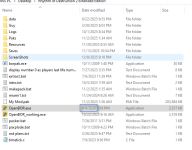
View attachment 13002View attachment 13003

Do all your frames you use have the same color palette? If not, the images you use in the code should have the same color palette. Check if your images have the same palette. If you have one of the images that is different from the rest inside the code, it results to messy colors. Double-check if any of your image has the same or different colors for your character. There must be some color error in one or some of the images you're using. The ones you're using need to have the same colors as/for a palette.

About png, what type of png did you use? Was it a 24-bit type or something?

Are you trying to copy the most outdated method that had very limited colors? If yes, don't do it. Stop relying on the most outdated method and the very old pal.act file. Start creating a new one with a new palette as its own. I usually use images as palettes instead of palette files because it's what I easily prefer to do. Have you tried using PalApply? Its the quickest tool to convert images for a palette you want. I use GIMP and open up images as layers so that I could accumulate all the colors from every image opened for all colors to be added when it's indexed. Let's say, for example, you open one image that has CVS Ryu with his idle frame. He has his mouth closed. I think that's 14 or less colors if it's indexed. But if you open one that has his teeth showing, one extra color comes up so that's 15 colors total. This is why I open images in layers, so I'd collect all colors from them.

Take a look at the tools in the Resources sections. They have tools you can use for your project(s).

I use Neo Edit Pack as a base for one of my projects too and I have pngs working well, but what I'm showing you from the images is not from that.
Thanks for your reply! There's a lot to look for now, but mainly I found that neo_edit uses a VERY old verion of the engine. Maybe that's why the same png files worked in one and not the other. While testing it, I tried loading the neo_edit project using the newest engine and my assets worked well.

About the png types, I'm not very familiar with graphic design so I may be doing a mess. I resized my sprites to have a closer size to the ones that the premade characters have, and made it color indexed by the default GIMP option that automatically creates a pallet, but I'll be using your idea of having them all as layers for the same file to make a complete pallet (as long as it's not too costly on memory later). I'm also not sure if I'm using a 24-bit type or not. While exporting the png, I just used all automatic configs from GIMP and hope for the best. So far it's working well, but I might need to learn more about this technicalities of the sprite files later on. My goal now is to get some fully playable characters and a new level working as fast as possible, releasing it here and collect feedback on what to improve and mistakes I may be making.

Anyway, your reply has set me on the right tracks and I managed to solve the issue. Thank you very much!
 
I think one thing I forgot to mention is that I always use images as palettes. If I open all images in layer mode and index them (GIMP loads depending on how many images you have opened), I right-click the palette box and select "Rearrange Colormap." You drag that color box of the background to the first box or the very top-left corner. Hit enter and you can save one image as a png file for a palette. No need to worry about saving the rest manually. Well, that's me when it comes to saving one image as/for a palette instead of making palette files. I know there are people who do different ways of saving files for palettes and I'm fine with those who do differently, such as using Alferd Spritesheet Unpacker to split from sprite sheets to separate images.

About opening all images as layers, I always open one image first (especially the first one) before I start dragging the rest into layer mode. That way, I don't have to go with selecting an option of opening images as layers unless I feel like to.

There's a lot to look for now, but mainly I found that neo_edit uses a VERY old verion of the engine. Maybe that's why the same png files worked in one and not the other. While testing it, I tried loading the neo_edit project using the newest engine and my assets worked well.

The first time I tried that, it had original bor.exe and when I tried it, it was WAY too limited for me to code. The one I struggled most was creating new color palettes but at that time, I didn't know how to create new colors. I was stuck to relying on the old pal.act file. It took me a bit over one and a half years to get that working until I looked at one old mod of Zangief (as a protagonist). I also struggled with the old engine until I figured out by substituting bor.exe with OpenBOR.exe. It took me 3-4 months until I started to use OpenBOR.exe. About png's, there were no png's for OpenBOR at that time until the engine was updated. But I do remember the first time I used png was early 2010.

I need someone to enlighten me when png made its debut in OpenBOR because I forgot when exactly that happened.

I'm also not sure if I'm using a 24-bit type or not.
Me neither, as I was curious about the use of 24-bit type because it was mentioned by @DCurrent, and I have no clue about using that at all. Except it could be used for levels. But I don't bother using that. We let him or anyone here who has better knowledge of that enlighten us. I only save an image with just png and that's it.

If you want to know how to start OpenBOR, take a look at this.

 
Last edited:
Solution
I think one thing I forgot to mention is that I always use images as palettes. If I open all images in layer mode and index them (GIMP loads depending on how many images you have opened), I right-click the palette box and select "Rearrange Colormap." You drag that color box of the background to the first box or the very top-left corner. Hit enter and you can save one image as a png file for a palette. No need to worry about saving the rest manually. Well, that's me when it comes to saving one image as/for a palette instead of making palette files. I know there are people who do different ways of saving files for palettes and I'm fine with those who do differently, such as using Alferd Spritesheet Unpacker to split from sprite sheets to separate image.

About opening all images as layers, I always open one image first (especially the first one) before I start dragging the rest into layer mode. That way, I don't have to go with selecting an option of opening images as layers unless I feel like to.


The first time I tried that, it had original bor.exe and when I tried it, it was WAY too limited for me to code. The one I struggled most was creating new color palettes but at that time, I didn't know how to create new colors. I was stuck to relying on the old pal.act file. It took me a bit over one and a half years to get that working until I looked at one old mod of Zangief (as a protagonist). I also struggled with the old engine until I figured out by substituting bor.exe with OpenBOR.exe. It took me 3-4 months until I started to use OpenBOR.exe. About png's, there were no png's for OpenBOR at that time until the engine was updated. But I do remember the first time I used png was early 2010.

I need someone to enlighten me when png made its debut in OpenBOR because I forgot when exactly that happened.


Me neither, as I was curious about the use of 24-bit type because it was mentioned by @DCurrent, and I have no clue about using that at all. Except it could be used for levels. But I don't bother using that. We let him or anyone here who has better knowledge of that enlighten us. I only save an image with just png and that's it.

If you want to know how to start OpenBOR, take a look at this.

Thanks a lot! Hope you had a wonderful new year! I'm resuming work now after a few days of celebrating and I'll post once I have something playable ready.
 
No problem. If you have any question, feel free to ask.

EDIT: It's tedious to open/have all the images as layers to load (I always drag images to the layer part), but it's always my way/habit of doing it.
 
Last edited:
Back
Top Bottom