
MKLIUKANG1
Active member

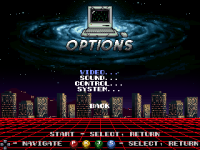

Positioned the menu navigation buttons

float ladd_x0, ladd_y0, ladd_z0, ladd_w0, ladd_h0; int ladd_type0;
float ladd_x1, ladd_y1, ladd_z1, ladd_w1, ladd_h1; int ladd_type1;
// ... up to ladd_x4
int ladd_count = 0;updatescript @script
void main()
{
setglobalvar("ladder_count", 1);
setglobalvar("ladder0_x", 100);
setglobalvar("ladder0_y", 95);
setglobalvar("ladder0_z", 0);
setglobalvar("ladder0_w", 40);
setglobalvar("ladder0_h", 190);
setglobalvar("ladder0_type", 0);
}
@end_script
I don't think you need an updatescript here, as since you aren't using any check first, you are setting those global variable in every engine update. You can move this for a levelscript, as it is fired once per level. Or even just add the script inline in any spawn on the level.Example for a single vertical ladder:
updatescript @script
void main()
{
setglobalvar("ladder_count", 1);
setglobalvar("ladder0_x", 100);
setglobalvar("ladder0_y", 95);
setglobalvar("ladder0_z", 0);
setglobalvar("ladder0_w", 40);
setglobalvar("ladder0_h", 190);
setglobalvar("ladder0_type", 0);
}
@end_script

Good job! I liked the custom menu via skiptoset/skipselect.
Hello everyone! It's been a while since we posted news. We have little free time, so we do what we can when possible. Here's what's new at the moment.
Implemented
1. Ladders and Rope
A full climbing system has been added, working for both players and enemies. The old ladder implementations had to be removed because they were broken and caused various issues.
Vertical Ladders
Enter with U/D. Smooth climbing up and down.
Protection against accidental re-grabbing.
Horizontal Ladders
Enter with U/D. Move left/right/up/down.
Width and height restrictions.
Automatic jumping off at boundaries.
Rope
Enter with L/R. Horizontal movement.
Punch attacks (A) and kick attacks (A2) directly on the rope.
Detach with Jump button.
Auto‑jump off at the ends.
For enemies (e.g., Guido), enemy_climber, enemy_stair2, enemy_rope functions have been implemented, allowing them to automatically attach to objects and move toward the player.
2. Weapons (Bat and Pipe)
Added Bat and Tube models.
A unique sound plays when picking up each weapon.
Fixed infinite sound repetition in the Get animation.
3. Pain and Fall Animations
Added new Fall/Pain animations reacting to different attack types.
Restored gravity on knockdown (fixed the "flying into space" bug).
Screen shake via the do_quake script + invisible Quaker object — now the effect triggers every time, not just once per game.
4. Technical Fixes
Removed the abs call and arrays not supported by the engine.
Added the universal finisher_all_falls function.
Optimized transitions in combo series.
Enemies correctly restore physics after leaving ladders and ropes.
All changes were made through scripts without modifying the engine's source code.
If you have questions or suggestions — write in the thread. Thanks everyone for your attention!
Thank you! I really appreciate the feedback. Using skiptoset and skipselect was the best way to bypass the engine's hardcoded limitations and fully implement the custom VHS/Retro Wave aesthetic I wanted.Good job! I liked the custom menu via skiptoset/skipselect.

I
I am probaably missing somethigng here. I can get the tracks to play but the overlay stay open throughout the level. How do I close i?.
// =========================================================================
// CUSTOM SOUNDTRACK PLAYER SCRIPT
// Developed by: MKLIUKANG1
// Optimized for OpenBOR Engine (Resolution: 320x240)
// =========================================================================

#define key_up      openborconstant("FLAG_MOVEUP")
#define key_down    openborconstant("FLAG_MOVEDOWN")
#define key_left    openborconstant("FLAG_MOVELEFT")
#define key_right   openborconstant("FLAG_MOVERIGHT")
#define key_attack  openborconstant("FLAG_ATTACK")
#define key_start   openborconstant("FLAG_START")

void main()
{
    // Check if the game is currently on a custom stage screen
    if (openborvariant("in_level"))
    {
        // Get button inputs for Player 1
        int player_index = 0;
        int newkeys = getplayerproperty(player_index, "newkeys");

        // Load menu global variables from OpenBOR memory
        int state = getglobalvar("menu_state");
        int track = getglobalvar("menu_soundtrack_track");
        int state_ticks = getglobalvar("menu_state_ticks");
        int selection = getglobalvar("menu_selection");
        int m_type = getglobalvar("menu_music_type");

        // Base initializations on first launch
        if(state == NULL()) { state = 2; setglobalvar("menu_state", 2); } // Turn on the player directly (state 2)
        if(track == NULL()) track = 0;
        if(state_ticks == NULL()) state_ticks = 0;
        if(m_type == NULL()) m_type = 0;

        // Interface alignment positions & dimensions
        int cx = 160;
        int sy = 100;
        int screen_w = 320;
        int screen_h = 240;
        int flash_color = rgbcolor(0, 200, 100); // Green neon glow palette
        int current_layer = 0;
        int i, y;

        // ---------- STATE 0: BLACK BACKGROUND ----------
        if (state == 0)
        {
            // Draw a full-screen black background
            drawbox(0, 0, screen_w, screen_h, 10, 0x000000, 0);
        }

        // ---------- SOUNDTRACK ENGINE (state == 2) ----------
        if (state == 2)
        {
            state_ticks++;

            // Wait a few frames before registering inputs to prevent accidental button double-triggers
            if (state_ticks > 2)
            {
                // Navigation controls through the 8 tracks (Indices 0 to 7)
                if (newkeys & key_up)   { track--; if (track < 0) track = 7; }
                if (newkeys & key_down) { track++; if (track > 7) track = 0; }

                // Audio mode toggle: Original vs Arranged
                if (newkeys & openborconstant("FLAG_SPECIAL"))
                {
                    if (m_type == 0) m_type = 1; // Switch to Arranged folder
                    else             m_type = 0; // Revert to Original folder
                }

                // Play the selected track upon attack button press
                if (newkeys & key_attack)
                {
                    // Dynamically choose folder prefix path based on selected mode
                    void path_prefix = (m_type == 1) ? "data/music/Arr/" : "data/music/";

                    if (track == 0)      playmusic(path_prefix + "Track_1.ogg", 1);
                    else if (track == 1) playmusic(path_prefix + "Track_2.ogg", 345892);
                    else if (track == 2) playmusic(path_prefix + "Track_3.ogg", 1);
                    else if (track == 3) playmusic(path_prefix + "Track_4.ogg", 1);
                    else if (track == 4) playmusic(path_prefix + "Track_5.ogg", 1);
                    else if (track == 5) playmusic(path_prefix + "Track_6.ogg", 1);
                    else if (track == 6) playmusic(path_prefix + "Track_7.ogg", 1);
                    else if (track == 7) playmusic(path_prefix + "Track_8.ogg", 1);
                }

                // Return or menu button handler
                if (newkeys & key_start)
                {
                    state = 0; // Close the jukebox and show black background
                }
            }

            // =========================================================================
            // UI RENDERING - BACKGROUND & BORDERS
            // =========================================================================
            drawbox(0, 0, screen_w, screen_h, 10, 0x000000, 0);
            drawbox(cx - 91, sy - 36, 220, 136, 95, 0x000000, 1);
            drawbox(cx - 95, sy - 40, 220, 136, 100, 0x14141E, 0);
            drawbox(cx - 94, sy - 39, 218, 1, 105, 0x3A3A4A, 0);
            drawbox(cx - 94, sy - 39, 1, 134, 105, 0x3A3A4A, 0);
            drawbox(cx - 95, sy - 42, 220, 4, 108, flash_color, 1);
            drawbox(cx - 95, sy - 42, 220, 2, 110, flash_color, 0);

            // Title Header Text
            drawstring(cx - 75, sy - 28, 1, "SOUNDTRACK", 600);

            // Track Counter Display (E.g. "[ 1 / 8 ]")
            int display_track = track + 1;
            drawstring(cx + 40, sy - 28, 1, "[ " + display_track + " / 8 ]", 600);

            // Active Music Mode Badge Graphic
            if (m_type == 1) {
                drawbox(cx - 50, sy - 17, 100, 8, 105, rgbcolor(0, 120, 255), 0);
                drawstring(cx - 42, sy - 17, 0, "MODE: ARRANGED", 600);
            } else {
                drawbox(cx - 50, sy - 17, 100, 8, 105, rgbcolor(10, 132, 0), 0);
                drawstring(cx - 40, sy - 17, 0, "MODE: ORIGINAL", 600);
            }

            // Inner Playlist Box Elements
            drawbox(cx - 90, sy - 6, 210, 100, 101, 0x0D0D14, 0);
            drawbox(cx - 92, sy - 8, 214, 2, 610, flash_color, 0);
            drawbox(cx - 92, sy + 94, 214, 2, 610, flash_color, 0);
            drawbox(cx - 92, sy - 8, 2, 104, 610, flash_color, 0);
            drawbox(cx + 120, sy - 8, 2, 104, 610, flash_color, 0);
            drawbox(cx - 90, sy - 6, 210, 1, 610, 0xFFFFFF, 0);
            drawbox(cx - 90, sy + 93, 210, 1, 610, 0xFFFFFF, 0);
            drawbox(cx - 90, sy - 6, 1, 100, 610, 0xFFFFFF, 0);
            drawbox(cx + 119, sy - 6, 1, 100, 610, 0xFFFFFF, 0);

            // Flashing Scroll Arrows Logic
            if ((state_ticks / 10) % 2 == 0) {
                drawstring(cx + 12, sy - 5, 1, "^", 620);
                drawstring(cx + 12, sy + 84, 1, "v", 620);
            }

            // Looping playlist rendering loop (Renders previous, active, and upcoming track names)
            for (i = 0; i < 3; i++) {
                int target_track = track + (i - 1);
                if (target_track < 0) target_track = 7;
                if (target_track > 7) target_track = 0;

                y = sy + 4 + i * 28;

                if (i == 1) {
                    // Accent Neon Glow Highlight for selected track list item
                    drawbox(cx - 88, y - 2, 206, 22, 112, flash_color, 1);
                    drawbox(cx - 86, y, 202, 18, 114, flash_color, 1);
                    drawbox(cx - 85, y + 1, 200, 16, 116, flash_color, 0);
                    drawbox(cx - 85, y, 200, 1, 118, 0xFFFFFF, 0);
                    drawbox(cx - 85, y + 17, 200, 1, 118, 0xFFFFFF, 0);
                    current_layer = 1; // High contrast text color layer
                } else {
                    // Standard backing plinth for inactive items
                    drawbox(cx - 85, y + 2, 200, 14, 102, 0x13131F, 0);
                    current_layer = 0; // Default text color layer
                }

                // Audio track labeling checks
                if (target_track == 0)      drawstring(cx - 60, y + 4, current_layer, "TRACK 1", 600);
                else if (target_track == 1) drawstring(cx - 60, y + 4, current_layer, "TRACK 2", 600);
                else if (target_track == 2) drawstring(cx - 60, y + 4, current_layer, "TRACK 3", 600);
                else if (target_track == 3) drawstring(cx - 60, y + 4, current_layer, "TRACK 4", 600);
                else if (target_track == 4) drawstring(cx - 60, y + 4, current_layer, "TRACK 5", 600);
                else if (target_track == 5) drawstring(cx - 60, y + 4, current_layer, "TRACK 6", 600);
                else if (target_track == 6) drawstring(cx - 60, y + 4, current_layer, "TRACK 7", 600);
                else if (target_track == 7) drawstring(cx - 60, y + 4, current_layer, "TRACK 8", 600);
            }

            // Lower Info Panel Footer Box
            drawbox(cx - 95, sy + 101, 220, 34, 104, 0x0A0A0F, 0);
            drawbox(cx - 95, sy + 100, 220, 1, 106, 0x252535, 0);

            // Centered control layout labels
            drawstring(cx - 35, sy + 104, 1, "SPECIAL: MODE", 600);
            drawstring(cx - 30, sy + 114, 1, "ATTACK: PLAY", 600);
        }

        // Commit and write menu status updates back to engine RAM variables
        setglobalvar("menu_state", state);
        setglobalvar("menu_soundtrack_track", track);
        setglobalvar("menu_state_ticks", state_ticks);
        setglobalvar("menu_selection", selection);
        setglobalvar("menu_music_type", m_type);
    }
}Thanks a lot! I appreciate the support. Glad you like how it's turning out!Ridiculous amount of work, feels great to watch thesecongrats!


