
MKLIUKANG1
Active member

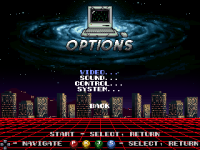

Positioned the menu navigation buttons

float ladd_x0, ladd_y0, ladd_z0, ladd_w0, ladd_h0; int ladd_type0;
float ladd_x1, ladd_y1, ladd_z1, ladd_w1, ladd_h1; int ladd_type1;
// ... up to ladd_x4
int ladd_count = 0;updatescript @script
void main()
{
setglobalvar("ladder_count", 1);
setglobalvar("ladder0_x", 100);
setglobalvar("ladder0_y", 95);
setglobalvar("ladder0_z", 0);
setglobalvar("ladder0_w", 40);
setglobalvar("ladder0_h", 190);
setglobalvar("ladder0_type", 0);
}
@end_script
I don't think you need an updatescript here, as since you aren't using any check first, you are setting those global variable in every engine update. You can move this for a levelscript, as it is fired once per level. Or even just add the script inline in any spawn on the level.Example for a single vertical ladder:
updatescript @script
void main()
{
setglobalvar("ladder_count", 1);
setglobalvar("ladder0_x", 100);
setglobalvar("ladder0_y", 95);
setglobalvar("ladder0_z", 0);
setglobalvar("ladder0_w", 40);
setglobalvar("ladder0_h", 190);
setglobalvar("ladder0_type", 0);
}
@end_script

Good job! I liked the custom menu via skiptoset/skipselect.
Hello everyone! It's been a while since we posted news. We have little free time, so we do what we can when possible. Here's what's new at the moment.
Implemented
1. Ladders and Rope
A full climbing system has been added, working for both players and enemies. The old ladder implementations had to be removed because they were broken and caused various issues.
Vertical Ladders
Enter with U/D. Smooth climbing up and down.
Protection against accidental re-grabbing.
Horizontal Ladders
Enter with U/D. Move left/right/up/down.
Width and height restrictions.
Automatic jumping off at boundaries.
Rope
Enter with L/R. Horizontal movement.
Punch attacks (A) and kick attacks (A2) directly on the rope.
Detach with Jump button.
Auto‑jump off at the ends.
For enemies (e.g., Guido), enemy_climber, enemy_stair2, enemy_rope functions have been implemented, allowing them to automatically attach to objects and move toward the player.
2. Weapons (Bat and Pipe)
Added Bat and Tube models.
A unique sound plays when picking up each weapon.
Fixed infinite sound repetition in the Get animation.
3. Pain and Fall Animations
Added new Fall/Pain animations reacting to different attack types.
Restored gravity on knockdown (fixed the "flying into space" bug).
Screen shake via the do_quake script + invisible Quaker object — now the effect triggers every time, not just once per game.
4. Technical Fixes
Removed the abs call and arrays not supported by the engine.
Added the universal finisher_all_falls function.
Optimized transitions in combo series.
Enemies correctly restore physics after leaving ladders and ropes.
All changes were made through scripts without modifying the engine's source code.
If you have questions or suggestions — write in the thread. Thanks everyone for your attention!
Thank you! I really appreciate the feedback. Using skiptoset and skipselect was the best way to bypass the engine's hardcoded limitations and fully implement the custom VHS/Retro Wave aesthetic I wanted.Good job! I liked the custom menu via skiptoset/skipselect.

I
I am probaably missing somethigng here. I can get the tracks to play but the overlay stay open throughout the level. How do I close i?.
// =========================================================================
// CUSTOM SOUNDTRACK PLAYER SCRIPT
// Developed by: MKLIUKANG1
// Optimized for OpenBOR Engine (Resolution: 320x240)
// =========================================================================

#define key_up      openborconstant("FLAG_MOVEUP")
#define key_down    openborconstant("FLAG_MOVEDOWN")
#define key_left    openborconstant("FLAG_MOVELEFT")
#define key_right   openborconstant("FLAG_MOVERIGHT")
#define key_attack  openborconstant("FLAG_ATTACK")
#define key_start   openborconstant("FLAG_START")

void main()
{
    // Check if the game is currently on a custom stage screen
    if (openborvariant("in_level"))
    {
        // Get button inputs for Player 1
        int player_index = 0;
        int newkeys = getplayerproperty(player_index, "newkeys");

        // Load menu global variables from OpenBOR memory
        int state = getglobalvar("menu_state");
        int track = getglobalvar("menu_soundtrack_track");
        int state_ticks = getglobalvar("menu_state_ticks");
        int selection = getglobalvar("menu_selection");
        int m_type = getglobalvar("menu_music_type");

        // Base initializations on first launch
        if(state == NULL()) { state = 2; setglobalvar("menu_state", 2); } // Turn on the player directly (state 2)
        if(track == NULL()) track = 0;
        if(state_ticks == NULL()) state_ticks = 0;
        if(m_type == NULL()) m_type = 0;

        // Interface alignment positions & dimensions
        int cx = 160;
        int sy = 100;
        int screen_w = 320;
        int screen_h = 240;
        int flash_color = rgbcolor(0, 200, 100); // Green neon glow palette
        int current_layer = 0;
        int i, y;

        // ---------- STATE 0: BLACK BACKGROUND ----------
        if (state == 0)
        {
            // Draw a full-screen black background
            drawbox(0, 0, screen_w, screen_h, 10, 0x000000, 0);
        }

        // ---------- SOUNDTRACK ENGINE (state == 2) ----------
        if (state == 2)
        {
            state_ticks++;

            // Wait a few frames before registering inputs to prevent accidental button double-triggers
            if (state_ticks > 2)
            {
                // Navigation controls through the 8 tracks (Indices 0 to 7)
                if (newkeys & key_up)   { track--; if (track < 0) track = 7; }
                if (newkeys & key_down) { track++; if (track > 7) track = 0; }

                // Audio mode toggle: Original vs Arranged
                if (newkeys & openborconstant("FLAG_SPECIAL"))
                {
                    if (m_type == 0) m_type = 1; // Switch to Arranged folder
                    else             m_type = 0; // Revert to Original folder
                }

                // Play the selected track upon attack button press
                if (newkeys & key_attack)
                {
                    // Dynamically choose folder prefix path based on selected mode
                    void path_prefix = (m_type == 1) ? "data/music/Arr/" : "data/music/";

                    if (track == 0)      playmusic(path_prefix + "Track_1.ogg", 1);
                    else if (track == 1) playmusic(path_prefix + "Track_2.ogg", 345892);
                    else if (track == 2) playmusic(path_prefix + "Track_3.ogg", 1);
                    else if (track == 3) playmusic(path_prefix + "Track_4.ogg", 1);
                    else if (track == 4) playmusic(path_prefix + "Track_5.ogg", 1);
                    else if (track == 5) playmusic(path_prefix + "Track_6.ogg", 1);
                    else if (track == 6) playmusic(path_prefix + "Track_7.ogg", 1);
                    else if (track == 7) playmusic(path_prefix + "Track_8.ogg", 1);
                }

                // Return or menu button handler
                if (newkeys & key_start)
                {
                    state = 0; // Close the jukebox and show black background
                }
            }

            // =========================================================================
            // UI RENDERING - BACKGROUND & BORDERS
            // =========================================================================
            drawbox(0, 0, screen_w, screen_h, 10, 0x000000, 0);
            drawbox(cx - 91, sy - 36, 220, 136, 95, 0x000000, 1);
            drawbox(cx - 95, sy - 40, 220, 136, 100, 0x14141E, 0);
            drawbox(cx - 94, sy - 39, 218, 1, 105, 0x3A3A4A, 0);
            drawbox(cx - 94, sy - 39, 1, 134, 105, 0x3A3A4A, 0);
            drawbox(cx - 95, sy - 42, 220, 4, 108, flash_color, 1);
            drawbox(cx - 95, sy - 42, 220, 2, 110, flash_color, 0);

            // Title Header Text
            drawstring(cx - 75, sy - 28, 1, "SOUNDTRACK", 600);

            // Track Counter Display (E.g. "[ 1 / 8 ]")
            int display_track = track + 1;
            drawstring(cx + 40, sy - 28, 1, "[ " + display_track + " / 8 ]", 600);

            // Active Music Mode Badge Graphic
            if (m_type == 1) {
                drawbox(cx - 50, sy - 17, 100, 8, 105, rgbcolor(0, 120, 255), 0);
                drawstring(cx - 42, sy - 17, 0, "MODE: ARRANGED", 600);
            } else {
                drawbox(cx - 50, sy - 17, 100, 8, 105, rgbcolor(10, 132, 0), 0);
                drawstring(cx - 40, sy - 17, 0, "MODE: ORIGINAL", 600);
            }

            // Inner Playlist Box Elements
            drawbox(cx - 90, sy - 6, 210, 100, 101, 0x0D0D14, 0);
            drawbox(cx - 92, sy - 8, 214, 2, 610, flash_color, 0);
            drawbox(cx - 92, sy + 94, 214, 2, 610, flash_color, 0);
            drawbox(cx - 92, sy - 8, 2, 104, 610, flash_color, 0);
            drawbox(cx + 120, sy - 8, 2, 104, 610, flash_color, 0);
            drawbox(cx - 90, sy - 6, 210, 1, 610, 0xFFFFFF, 0);
            drawbox(cx - 90, sy + 93, 210, 1, 610, 0xFFFFFF, 0);
            drawbox(cx - 90, sy - 6, 1, 100, 610, 0xFFFFFF, 0);
            drawbox(cx + 119, sy - 6, 1, 100, 610, 0xFFFFFF, 0);

            // Flashing Scroll Arrows Logic
            if ((state_ticks / 10) % 2 == 0) {
                drawstring(cx + 12, sy - 5, 1, "^", 620);
                drawstring(cx + 12, sy + 84, 1, "v", 620);
            }

            // Looping playlist rendering loop (Renders previous, active, and upcoming track names)
            for (i = 0; i < 3; i++) {
                int target_track = track + (i - 1);
                if (target_track < 0) target_track = 7;
                if (target_track > 7) target_track = 0;

                y = sy + 4 + i * 28;

                if (i == 1) {
                    // Accent Neon Glow Highlight for selected track list item
                    drawbox(cx - 88, y - 2, 206, 22, 112, flash_color, 1);
                    drawbox(cx - 86, y, 202, 18, 114, flash_color, 1);
                    drawbox(cx - 85, y + 1, 200, 16, 116, flash_color, 0);
                    drawbox(cx - 85, y, 200, 1, 118, 0xFFFFFF, 0);
                    drawbox(cx - 85, y + 17, 200, 1, 118, 0xFFFFFF, 0);
                    current_layer = 1; // High contrast text color layer
                } else {
                    // Standard backing plinth for inactive items
                    drawbox(cx - 85, y + 2, 200, 14, 102, 0x13131F, 0);
                    current_layer = 0; // Default text color layer
                }

                // Audio track labeling checks
                if (target_track == 0)      drawstring(cx - 60, y + 4, current_layer, "TRACK 1", 600);
                else if (target_track == 1) drawstring(cx - 60, y + 4, current_layer, "TRACK 2", 600);
                else if (target_track == 2) drawstring(cx - 60, y + 4, current_layer, "TRACK 3", 600);
                else if (target_track == 3) drawstring(cx - 60, y + 4, current_layer, "TRACK 4", 600);
                else if (target_track == 4) drawstring(cx - 60, y + 4, current_layer, "TRACK 5", 600);
                else if (target_track == 5) drawstring(cx - 60, y + 4, current_layer, "TRACK 6", 600);
                else if (target_track == 6) drawstring(cx - 60, y + 4, current_layer, "TRACK 7", 600);
                else if (target_track == 7) drawstring(cx - 60, y + 4, current_layer, "TRACK 8", 600);
            }

            // Lower Info Panel Footer Box
            drawbox(cx - 95, sy + 101, 220, 34, 104, 0x0A0A0F, 0);
            drawbox(cx - 95, sy + 100, 220, 1, 106, 0x252535, 0);

            // Centered control layout labels
            drawstring(cx - 35, sy + 104, 1, "SPECIAL: MODE", 600);
            drawstring(cx - 30, sy + 114, 1, "ATTACK: PLAY", 600);
        }

        // Commit and write menu status updates back to engine RAM variables
        setglobalvar("menu_state", state);
        setglobalvar("menu_soundtrack_track", track);
        setglobalvar("menu_state_ticks", state_ticks);
        setglobalvar("menu_selection", selection);
        setglobalvar("menu_music_type", m_type);
    }
}Thanks a lot! I appreciate the support. Glad you like how it's turning out!Ridiculous amount of work, feels great to watch thesecongrats!


 Mini-Game List
 Mini-Game Activation
 Technical Details

# Development Report: Mini-Game System for Double Dragon Mini (OpenBOR)
As part of the fan-made, non-commercial project "Double Dragon Mini" powered by the OpenBOR engine, a collection of eight arcade mini-games built directly into the main menu has been implemented. Each mini-game is rendered using engine primitives (rectangles, lines) and runs on top of the standard user interface. Activation is handled via secret cheat codes entered on the title screen or in the main menu.
1. Pong
Classic ping-pong. Control paddles via keyboard (Player 1 and optional Player 2) or play against the AI. The AI features reaction delay and randomized mistakes to ensure fair gameplay. The ball features color cycling effects, accompanied by dedicated sound effects for bounces, hits, and goals.
2. Galaga
Vertical space shooter. Enemies are aligned in formation and periodically dive down to attack the player. Enemies are capable of firing projectiles. Features multiple levels, a life system, and custom sound effects for shooting, explosions, and hits.
3. Breakout
Brick-breaking arcade game. Features multiple levels, progressive ball speed, multi-colored bricks with varying point values, a brief pause upon losing a life, and dedicated sound effects.
4. Snake
Classic snake game. Collect food, grow longer, and avoid walls or your own tail. Movement speed increases as the snake grows. Features multiple levels, eating sound effects, and game over sounds.
5. Flappy Bird
Flap and navigate between pipes. Features gravity physics, jumping mechanics, and progressive difficulty (increasing pipe speed and narrower gaps). Includes sound effects for jumping, collisions, and scoring.
6. Whack-a-Mole
Hit moles popping out of holes. The cursor navigates between four available holes. Features time limits, a life system, multiple levels, and custom sound effects for hits and mole spawns.
7. Dodge the Falling Objects
Evade incoming hazards falling from above. Features a progressive increase in speed and spawn rates, post-hit invulnerability frames, a player sprite flashing effect, and custom sound effects.
8. Tetris
A fully featured Tetris clone with seven standard tetrominoes, rotation mechanics, line clearing, score tracking, and levels. Features a "Next Piece" preview box and a randomized generation algorithm that avoids back-to-back duplicate pieces.
Each game is launched by entering a secret code on the title screen or in the main menu.
Examples:
- Pong: ← ← → → ↑ ↑ ↓ ↓ ← ← → → ↑ ↑ ↓ ↓
- Breakout: ← ← ↑ ↑ → → ↓ ↓
Additionally, there is a master Mini-Game Selection Menu unlocked via a special code. In this menu, players can cycle through games using the ← → arrow keys and launch the selected game by pressing the Attack button.
- Engine Integration: All mini-games are coded entirely in the OpenBOR scripting language (C-script) and integrated directly into the main menu.
- Procedural Graphics: Visuals are rendered procedurally using `drawbox`, `drawline`, and `drawstring`. No external sprites are used (except for the "Special" button prompt icon).
- State Management: Global variables are utilized to store the game states, ensuring seamless execution within the engine's update loop.
- Balanced Difficulty: Core gameplay features a balanced difficulty curve, starting easy and scaling up speed, frequencies, or obstacles with each consecutive level.


Thx)nice work!
Thank you for the kind words! I'm really glad you liked it, especially Tetris — yes, the logic is a bit trickier than it seems at first glance.Very impressive work @MKLIUKANG1. Especially the Tetris game. For anyone not aware, Tetris may be a simple in concept, but the underlying logic is much more complex than it looks. I had to build one for one of my early undergrad classes. Maybe not the hardest assignment in the world, but definitely has some pain points to work through and flexes your coding muscle a bit.
I made mine by treating the entire field as an array of 200 bits (20 * 10) representing the small blocks that assemble each piece. Then used a separate logic that set the bits on or off based on hard coded shapes of blocks and their positions. From there you could compute when to add, remove, or reposition rows. I am very curious to see how you built your version here.
The other games are all great work as well.
Keep it up sir!
DC
setglobalvar("tetris_cell_" + col + "_" + row, value);tetris_update_blocks().tetris_generate_type(exclude_type)
