
You are using an out of date browser. It may not display this or other websites correctly.
You should upgrade or use an alternative browser.
You should upgrade or use an alternative browser.
Canceled [ORIGINAL] Shinobi Densetsu (HELP NEEDED!)
- Thread starter kzr
- Start date
Project is halted prior to completion and will not receive further updates.

I was waiting for a few more tests from him but for reference the issue was solved by removing the speed property from the panel character header and leaving only the scroll with the value of 1. It makes sense because this is the same value used to synchronize fglayers with the screen scrolling too.
C:
name UI_HP
type panel

#coords 48 800 0
scroll 1
setlayer   800
kzr
Member
since default screens are mostly static (except cutscenes), is it possible to somehow use scripts to improve the presentation? I've seen functions that handle menu related stuff
also is it possible to change the position of default menus? I redesigned my title screen and would like the text to be drawn in the big black space on the lower left
character select screen also got a new background, but I really wish there was more going on than just static images. image scale needs a small adjustment to fit character scale but I'd love to have some animated plants and maybe a sunlight effect topped off with fitting background sounds
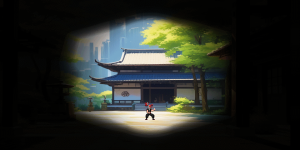
also is it possible to change the position of default menus? I redesigned my title screen and would like the text to be drawn in the big black space on the lower left
character select screen also got a new background, but I really wish there was more going on than just static images. image scale needs a small adjustment to fit character scale but I'd love to have some animated plants and maybe a sunlight effect topped off with fitting background sounds

O Ilusionista
Captain 100K
Yeah, take a look here - you will need some scripts Exhibition - Custom Main Menualso is it possible to change the position of default menus? I redesigned my title screen and would like the text to be drawn in the big black space on the lower left
character select screen also got a new background, but I really wish there was more going on than just static images. image scale needs a small adjustment to fit character scale but I'd love to have some animated plants and maybe a sunlight effect topped off with fitting background sounds
Its doable, using entities. Take a look at 0:19
I've made a tutorial long time ago: Animated screens - the easy way.
kzr
Member
I really appreciate all the resources but I don't even know where to start with scripts. my game doesn't even have a scripts folder. where can I start with the basics?Yeah, take a look here - you will need some scripts Exhibition - Custom Main Menu
Its doable, using entities. Take a look at 0:19
I've made a tutorial long time ago: Animated screens - the easy way.
O Ilusionista
Captain 100K
on this case, you can download the demo above and copy the scripts folder and past into your data folder.but I don't even know where to start with scripts. my game doesn't even have a scripts folder. where can I start with the basics?
So in the end, you will have this:
data/scripts/updated.c
Take a look at the manual about Global events Legacy Manual – OpenBOR Wiki
Basically, there are certain types of scripts that you just need to have the file named with a specific name within the scripts folder and it will be read and executed by the engine.
important: you need to copy the scripts.txt file from that demo and place it in your folder. Or just add "alwaysupdate 1" in your own data/script.txt file
kzr
Member
on this case, you can download the demo above and copy the scripts folder and past into your data folder.
So in the end, you will have this:
Take a look at the manual about Global events Legacy Manual – OpenBOR Wiki
Basically, there are certain types of scripts that you just need to have the file named with a specific name within the scripts folder and it will be read and executed by the engine.
important: you need to copy the scripts.txt file from that demo and place it in your folder. Or just add "alwaysupdate 1" in your own data/script.txt file
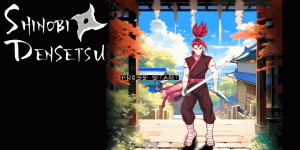
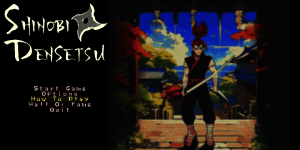
that was smooth. took the opportunity to start adding custom fonts
Is there any way to extend the title screen timeout? it resets after 30 seconds or so
Last edited:
O Ilusionista
Captain 100K
hum, I don't think so. At least, I don't remember anything about this.Is there any way to extend the title screen timeout? it resets after 30 seconds or so
Btw, since you are working with custom fonts, maybe this tutorial I wrote would be useful for you Tutorial - Font Cursor Replacement / Fake cursor for menus
kzr
Member
that's too bad... I have a great title theme but you don't get to hear much of ithum, I don't think so. At least, I don't remember anything about this.
Btw, since you are working with custom fonts, maybe this tutorial I wrote would be useful for you Tutorial - Font Cursor Replacement / Fake cursor for menus
here's a full preview of how the UI facelift is coming along. HUD is still far from complete

Is there any way to extend the title screen timeout? it resets after 30 seconds or so
I'll see about making that as creator option. Should be pretty simple.
In the meantime you could work around with a complete replacement but I doubt you'll want to do that.
IIRC, you could also manipulate the elapsed time variable.
DC
@DCurrent Yeah, if we open a new changeable openborvariant (or constant) we can allow the devs to change the limit easily, currently it is defined to 20 seconds.I'll see about making that as creator option. Should be pretty simple.
We could open the time limit in the hall of fame too.
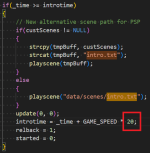
@kzr Based on @DCurrent concept I made some experiments and it's possible to change it with scripts.In the meantime you could work around with a complete replacement but I doubt you'll want to do that.
IIRC, you could also manipulate the elapsed time variable.
Put the script below inside your updated.c file at "data/scripts", you will need to create one in case don't have it.
Basically it will reset the engine timer at the title screen how many times you need, considering that each loop have 20 seconds, to extend it to 1 minute you will need to define the maxCounter value to 2.
C:
void main()
{
    float engineTime = 200; //DEFAULT ENGINE TIME IN CENTISECONDS
    float time = openborvariant("elapsed_time")/engineTime; //CURRENT ELAPSED TIME
    float resetLimit = 20; //THIS IS THE DEFAULT ENGINE TITLE SCREEN DURATION
    float maxCounter = 1; //THIS HOW MANY TIMES THE COUNTER WILL LOOP, CHANGE IT FREELY

    //EXECUTE THE SCRIPT DURING THE TITLE SCREEN
    if(openborvariant("in_titlescreen")){

        //START THE COUNTER IF NULL
        if(getlocalvar("resetCounter") == NULL())
        {
            changeopenborvariant("elapsed_time", 0);
            setlocalvar("resetCounter", 0);
        }
        else
        {
            //DEFAULT INTRO.TXT TIME REACHED THE LIMIT?? PERFORM THE LOOP COUNTER
            if(time >= resetLimit)
            {
                //IS THE COUNTER LOWER THAN THE DEFINED LIMIT?? RESET THE TIMER AND ADD COUNT +1
                if(getlocalvar("resetCounter") < maxCounter)
                {
                    changeopenborvariant("elapsed_time", 0);
                    setlocalvar("resetCounter", getlocalvar("resetCounter")+1);
                }
            }
        }
    }
    else
    {
        //NOT IN THE TITLE SCREEN?? CLEAR ALL LOCAL VARIABLES
        if(getlocalvar("resetCounter") != NULL())
        {
            clearlocalvar();
        }
    }

    //CLEAR ALL LOCAL VARIABLES DURING THE INTRO.TXT SCENE
    if(openborvariant("current_scene") == "data/scenes/intro.txt"){
        if(getlocalvar("resetCounter") != NULL())
        {
            clearlocalvar();
        }
    }

    //DISABLE THE INTRO.TXT TIMER IN THE MAIN MENU
    if(openborvariant("in_menuscreen")){
        if(time >= resetLimit)
        {
            changeopenborvariant("elapsed_time", 0);
        }
    }

    //DRAW INFO IN THE SCREEN, ERASE IT WHEN ALL TESTS ARE FINISHED
    drawstring(50, 50, 0, time);
    drawstring(50, 60, 0, getlocalvar("resetCounter"));
}
Die_In_Fire
Well-known member
Again, I’m quoting myself on this one:character select screen also got a new background, but I really wish there was more going on than just static images. image scale needs a small adjustment to fit character scale but I'd love to have some animated plants and maybe a sunlight effect topped off with fitting background sounds
View attachment 7101
Avengers game has animated select screen.Edit: as Ilu said, his avengers game is very useful on learning about select menu and other cool stuff. But I also recommend you give White Dragon’s TMNT Shellshock a look, there’s lot of cool custom presentation there too.
You even have a video DC posted about Golden Axe the hack job and it’s showing animated select screen on this same topic.
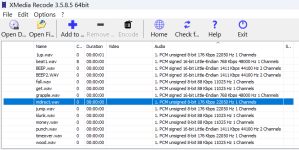
@kzr I saw you have some 8 bits samples in your game, this kind of sound can produce some noise/hiss and I suggest to convert all to 16 bits.has anyone noticed that playing wav samples produces a click noise at the beginning?
kzr
Member
thanks for the info. I suspected the bit depth could be the issue. need to overhaul the sound effects sometime in the future. is ogg reserved for music?@kzr I saw you have some 8 bits samples in your game, this kind of sound can produce some noise/hiss and I suggest to convert all to 16 bits.
View attachment 7114
is ogg reserved for music?
Yes. Music supports a proprietary .bor format that's basically adpcm with some header modifications and .ogg vorbis. Sounds are adpcm only.
Music is streamed directly from the data file, so don't worry about memory use. Sounds of course do reside in memory.
DC
O Ilusionista
Captain 100K
without more information given, its kinda hard to figure out.can anyone tell me why I get a game over on stage start even with 999 lives? I've tried adjusting min/max Z and spawn point but I can't understand where the problem is
Which type is your stage? Does it have any enemy?
kzr
Member
no enemies. is that a requirement? only thing I did was copy another level, delete spawns and adjust the z valueswithout more information given, its kinda hard to figure out.
Which type is your stage? Does it have any enemy?
O Ilusionista
Captain 100K
Yes, it isno enemies. is that a requirement?
 If there is no enemy, the stage is considered clear.
You either need an enemy there or you can change the stage type
type {type} {nospecial} {nohurt}
- Optional.
- {type} is a binary value which determines if the stage is a normal stage (0) or a bonus stage (1).
- Bonus stages end when all obstacles are destroyed, when there are no more items or when time runs out. Players won't lose a life if time runs out.
- 0 = normal level
- 1 = Used for bonus levels so a life isn't taken away if time expires.level->type == 1 means bonus level, else regular
- 2 = custom HUD (no bgicon.gif)
- {nospecial} Can use specials during bonus levels (default 0 - yes)
- {nohurt} Can hurt other players during bonus levels (default 0 - yes)